 Citenook1
Blog · Guides
NotebookLM limitations and common pitfalls, and how to avoid them
NotebookLM, now called Gemini Notebook, only answers from the sources you add, can't search across notebooks, caps each source at 500,000 words or 200 MB, imports only the text of web pages and YouTube transcripts, and limits how much you can ask every few hours. Most bad results come from a few habits: trusting citations without checking, one giant notebook, and assuming charts or scanned pages came through. Here's each limit and how to work around it.
This guide lists the hard limits Google states, the pitfalls that cause wrong or weak answers, how to remove sources, and when to use something else. Facts come from Google's Gemini Notebook help pages, checked on 19 October 2026, plus our own tests in a notebook with made-up files.
The hard limits
| Limit | What Google says | Workaround |
|---|---|---|
| One notebook at a time | "Each notebook is independent"; it can't read across notebooks | Merge related files into one notebook, or one combined document |
| Source size | Up to 500,000 words or 200 MB per uploaded file | Split very long files |
| Number of sources | 50 per notebook free, up to 300 on Pro and 500 to 600 on Ultra | See the source limit guide |
| Web pages | "Only the text content" is imported; no images, embedded videos or linked pages; paywalled pages aren't supported | Save the page as a PDF and upload it |
| YouTube | Only public videos with captions; only the transcript comes in | Upload the audio file instead if there are no captions |
| Google Sheets and Slides | Sheets limited to 100,000 tokens; Slides up to 100 slides | Split big sheets or decks |
| Usage | The quota "refreshes every 5 hours until you reach your weekly limit"; Google's plans page still mentions daily limits | Check Settings, Usage; see is NotebookLM free |
| Internet | It only runs online | See NotebookLM offline |
12 common pitfalls, and how to avoid them
- Expecting answers your files don't contain. Google says chat answers "only use data from your sources." If your sources don't cover it, add a source or ask a general assistant.
- Trusting citations without opening them. Google's own warning: "Gemini Notebook can make mistakes," so "be sure to double check it." In our test with pasted text, hovering a citation showed the top of the source rather than the exact line, so click through and find the sentence yourself.
- One giant notebook, or too many small ones. Notebooks can't see each other, so splitting by topic breaks questions that compare topics. Keep things you'll compare in the same notebook.
- Assuming a link brought in the whole page. Only the text comes in. Charts and images on the page are dropped, and paywalled articles fail.
- Adding videos without captions. No captions, no transcript, no source.
- Assuming charts, tables and scans came through. Google says "certain types of images may not work as well" and doesn't say how it handles charts or scanned pages. Ask a question about a chart before you rely on it, and run scans through OCR first.
- Editing a file and expecting the notebook to update. Only Google Drive sources sync, every few minutes. Uploaded files and pasted text are copies, so re-upload after changes.
- Copying a notebook to share it. "Chat history & notes are not copied." Share the original instead, or export what matters first.
- Editing exports and expecting them to sync. Notes exported to Google Docs or Sheets don't sync back.
- Sharing too widely. Personal accounts can share with up to 50 people and can't share with Google Groups. Viewers may still see sources and outputs, even in chat-only mode.
- Doing note work on your phone. The mobile app can't edit notes, and can't generate notes, mind maps, reports or data tables yet.
- Uploading confidential files without thinking. On personal accounts, Google says content isn't used to directly train its models unless you send feedback, but feedback can be read by human reviewers and kept up to three years. Google also says not to rely on it for "medical, legal, financial, or other professional advice."
How to remove a source
- Open the notebook and find the source in the Sources panel on the left.
- Hover over the source and click the three dots that appear.
- Choose Remove source, then confirm.
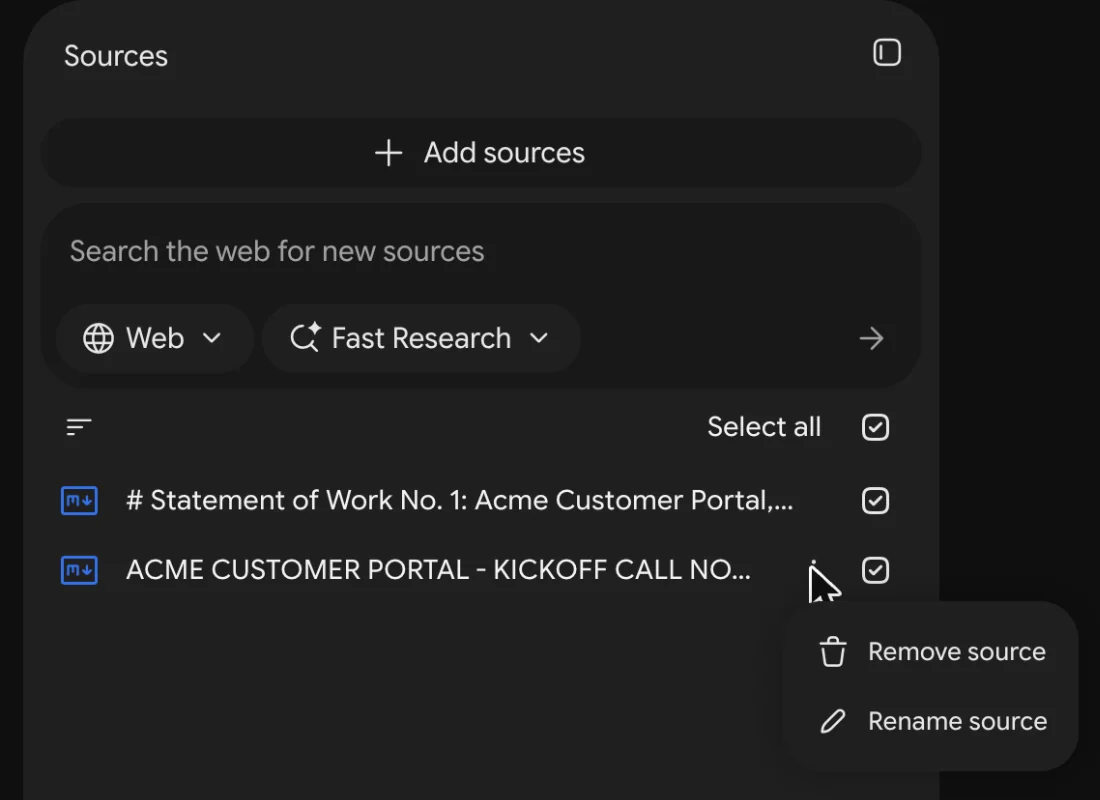
We found no built-in way to remove several sources at once; they go one by one, and a removed source can't be brought back except by adding it again. Removing a source never touches the original file in Google Drive. If you only want to leave a source out of answers for now, untick its checkbox instead.
Does NotebookLM have an API?
Not for personal accounts. Google offers a REST API for NotebookLM Enterprise, part of Google Cloud, and it's still marked as a pre-release version. Tools that claim to automate the consumer app are unofficial.
When to use something else
- You need answers beyond your files: the Gemini app, ChatGPT or Claude. See NotebookLM vs Gemini.
- You need to search a whole folder at once: a tool built for folders rather than notebooks.
- Your files can't leave your computer: an app that runs the model on your own machine.
Citenook covers the last two on a Mac. It reads whole folders in place, so there's no wall between notebooks and no source cap on higher plans; it keeps files up to date as you edit them; it can also add web pages and YouTube videos; and every answer links to the exact passage. With a model on your Mac, nothing is uploaded. It doesn't make Audio Overviews, quizzes or slides, and on-device models write simpler answers than Google's. See the full Citenook vs Gemini Notebook comparison.
Questions
What are the main limitations of NotebookLM?
It only answers from your sources, can't search across notebooks, caps each source at 500,000 words or 200 MB, imports only text from web pages and YouTube transcripts, has usage limits that refresh every few hours, and only works online.
Is NotebookLM accurate?
Usually, because it answers from your sources, but Google says it "can make mistakes." Open the citation and check the original sentence before you rely on an answer.
Can NotebookLM read images or scanned PDFs?
Google says certain images "may not work as well" and doesn't say how it handles scans or charts. Test with a question about the chart or page, and run scans through OCR first.
Can NotebookLM search across notebooks?
No. Each notebook is independent. Put sources you want to compare in the same notebook.
How do I delete a source in NotebookLM?
Hover over the source in the Sources panel, click the three dots, choose Remove source and confirm. It's one at a time, and the original file in Drive isn't affected.
Is NotebookLM safe for confidential files?
On personal accounts, Google says content isn't used to directly train its models unless you give feedback, which human reviewers may read. Work and school accounts aren't reviewed. Files still go to Google's servers.
Sources, checked 19 October 2026: Gemini Notebook Help on notebooks and sharing, adding sources, chat, notes, the mobile app, usage limits, plans and privacy; Google Cloud NotebookLM Enterprise API. Screenshot and citation test from our own notebook with made-up files.