 Citenook1
Blog · Comparisons
NotebookLM vs Gemini: what's different, and which to use

NotebookLM, now called Gemini Notebook, answers only from the sources you add, with a citation on every point, and can turn them into Audio Overviews, quizzes and slides. The Gemini app is Google's general assistant: it searches the web, runs Deep Research and takes up to 10 files per message. Since April 2026 they share notebooks, so you can chat with the same notebook in either app. Use Gemini Notebook for studying and checking sources, the Gemini app for everything else.
This guide covers the three ways Google now offers to work with your files, a side-by-side table, our own test asking both apps the same question about the same notebook, Gems and their move to skills, privacy, how NotebookLM compares with ChatGPT, and which to pick. Facts come from Google's help pages and blog, checked on 17 October 2026.
Gemini, Gemini Notebook and notebooks in Gemini
Most comparisons still treat these as two separate tools. In October 2026 there are three:
- The Gemini app (gemini.google.com and the phone apps): a general assistant. It answers from what the model knows, the web, and any files you attach.
- Gemini Notebook, renamed from NotebookLM on 16 July 2026: a separate research tool. Google's help page says its responses "are grounded exclusively in your notebook sources." It keeps the Studio tools: Audio and Video Overviews, mind maps, reports, flashcards, quizzes and slide decks.
- Notebooks in the Gemini app, launched in April 2026: the same notebooks, shown in Gemini's sidebar. Notebooks you create in Gemini Notebook "automatically appear in Gemini's navigation," and changes sync. But chats there "can include web searches and use of any Gemini tools," and Gemini can't make Studio items.
New to the notebook side? Start with what NotebookLM is and how to use it.
Side by side
| Gemini app chat | Gemini Notebook (was NotebookLM) | |
|---|---|---|
| Answers from | The model, the web and your files | Only your sources |
| Your files | Up to 10 files per message, 100 MB each (2 GB for video); a notebook in Gemini holds up to 600 sources by plan | 50 sources free, up to 300 on Pro and 500 to 600 on Ultra; 500,000 words or 200 MB each |
| Citations | Source chips that name the file | Numbered citations linked to the source |
| Web research | Web search and Deep Research reports | Fast Research and Deep Research to find new sources |
| Audio, video, quizzes, slides | No | Yes, in Studio |
| Images, Canvas, code | Yes | Infographics and Video Overviews from your sources; running code is rolling out on top plans |
| Price | Both free, with higher limits on Google AI Plus ($4.99), Pro ($19.99) and Ultra (from $99.99) a month, prices as checked 8 October 2026 | |
For plan details, see is NotebookLM free and NotebookLM's source limits.
Our test: the same notebook in both apps
We used one test notebook in our own Google account (Pro plan) with two made-up sources: a statement of work and kickoff call notes for a customer portal project. We asked the same question in Gemini Notebook (15 October) and in the Gemini app with that notebook attached through the plus menu, More uploads, Notebooks (17 October): "When is the production launch, and what could delay it?"
- Both got the date right: 11 December 2026.
- Gemini Notebook listed six risks, including a holiday-sale change freeze from 20 October to 5 November that the Gemini app missed. Each point had numbered citations; hovering one opened a preview of the source (for our pasted text, the top of the source rather than the exact line).
- The Gemini app listed five, adding the beta acceptance criteria that the notebook didn't mention. Its citations were small chips; clicking one showed only the file name, not the passage.
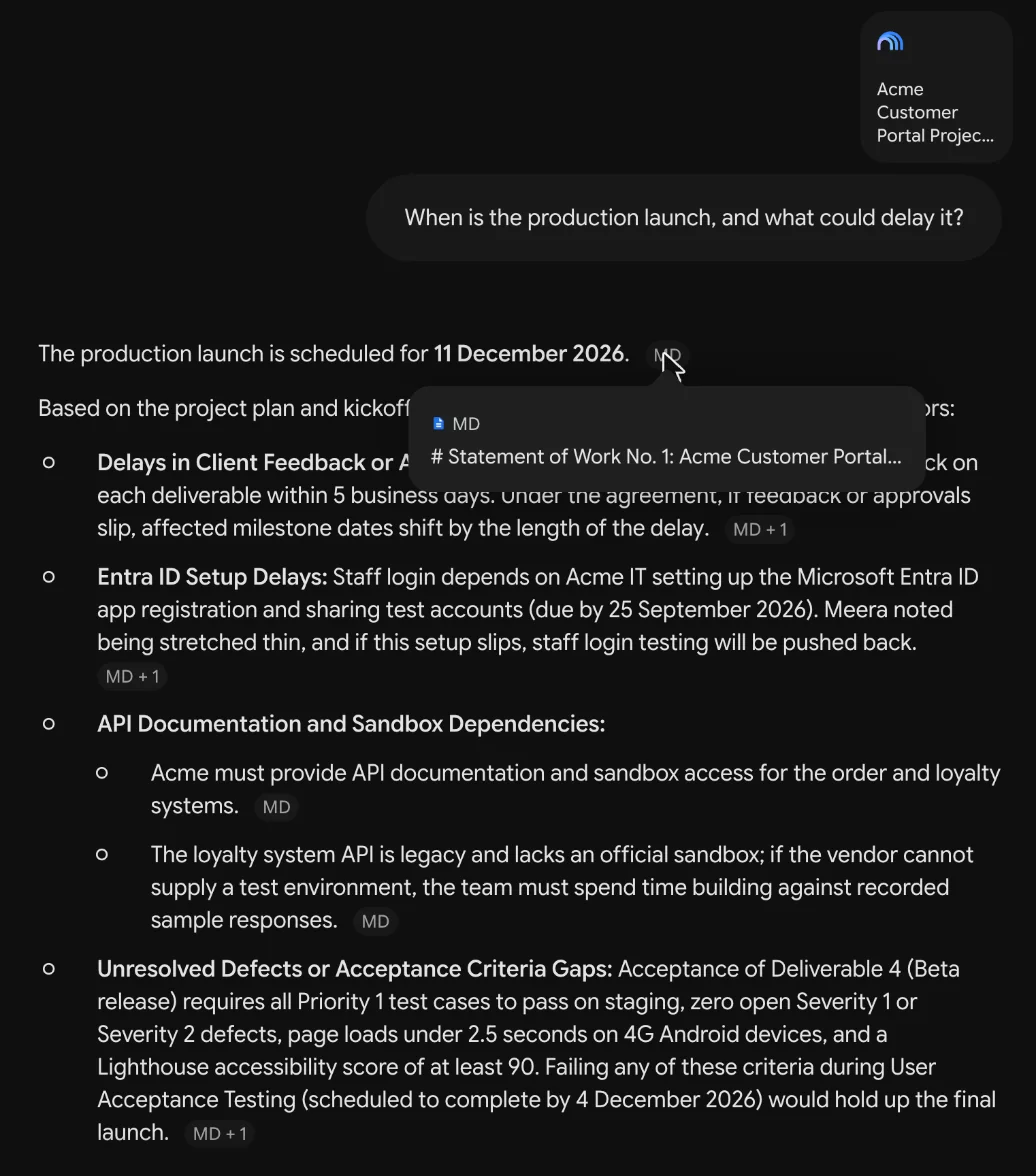
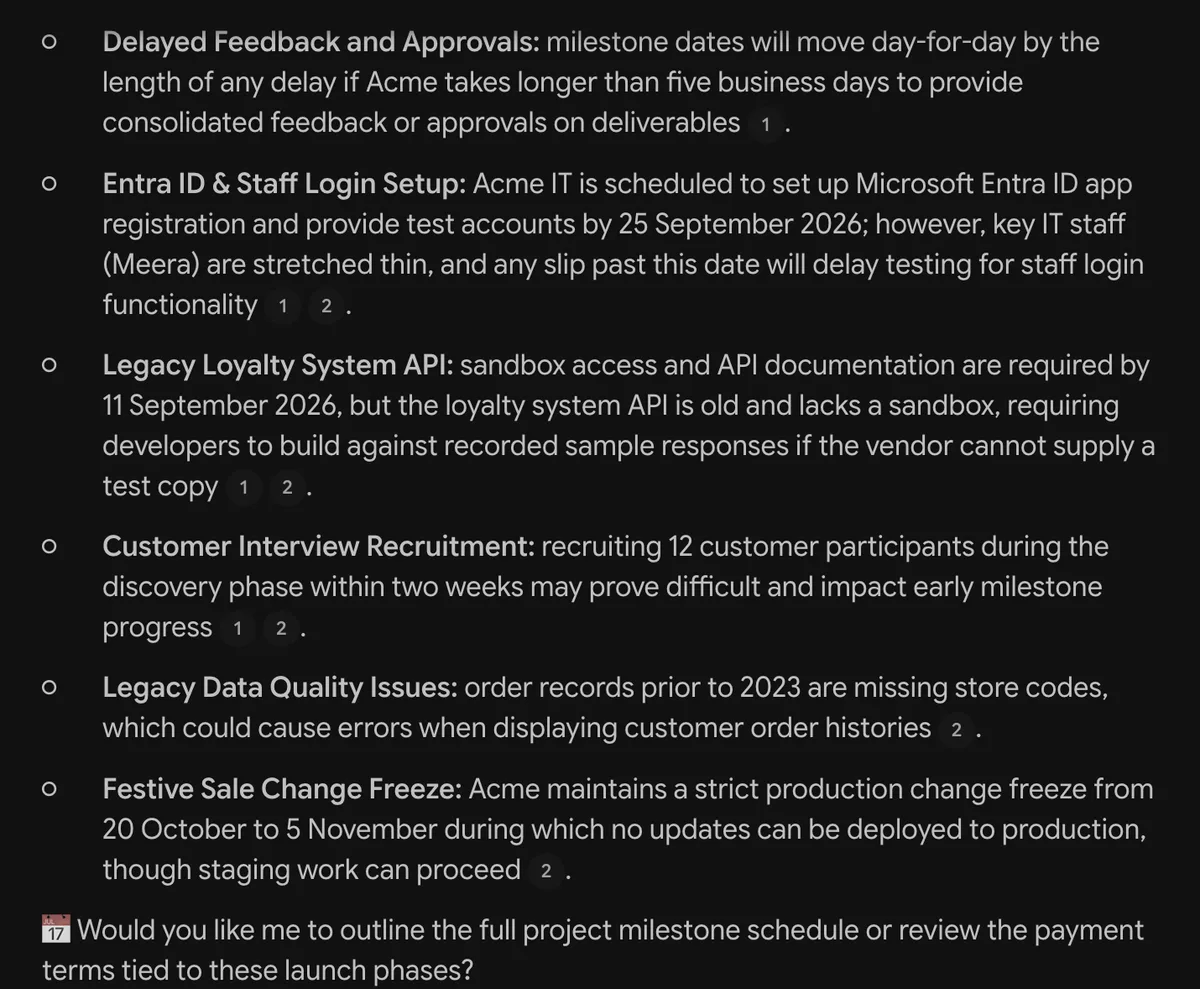
Neither answer was wrong, and each caught something the other missed. The difference is checking: Gemini Notebook ties every point to a numbered source you can open, while the Gemini app only names the file.
Gems are becoming skills
Gems are custom versions of Gemini with their own instructions and knowledge files, and they can use notebooks as knowledge. Google's help page says: "Starting in November 2026, Gems will transition to skills in Gemini Apps for personal Google Accounts, and in 2027, for work and school accounts." Existing Gems convert automatically. Google says notebooks for skills are "coming in the weeks ahead." If a comparison you're reading recommends building a Gem, keep that change in mind.
Privacy: which app you chat in matters
- Gemini app, personal account: Keep Activity is on by default for adults. Google uses that activity to improve its models, including training, and human reviewers read a subset of chats, kept up to three years. Google's own advice: "Please don't enter confidential information that you wouldn't want a reviewer to see."
- Gemini Notebook, personal account: Google says your content "will not be used to directly train" its models unless you send feedback.
- Work and school accounts: neither is used for training or human review.
Google doesn't spell out which rules apply when you chat with a notebook inside the Gemini app, so for sensitive sources, chat in Gemini Notebook itself or use a work account.
NotebookLM vs ChatGPT
The same split applies. ChatGPT answers from the model, the web and your files: up to 20 files per message, 512 MB each, and 5 to 40 files in a Project depending on plan. It doesn't limit itself to your sources, and its consumer plans train on your chats unless you turn that off. Gemini Notebook answers only from your sources, holds far more of them, and shows the passage behind each point. Pick ChatGPT for writing, coding and general questions; pick Gemini Notebook when every answer needs to trace back to a document. More in ChatGPT's file upload limits.
Which should you use?
- Studying from course materials: Gemini Notebook, for citations, flashcards, quizzes and Audio Overviews.
- Research where you must quote sources: Gemini Notebook.
- Finding new information on the web: the Gemini app, with Deep Research, then add the best sources to a notebook.
- Writing, images, code or quick questions: the Gemini app.
- A long project with the same files: a notebook, opened in whichever app suits the task.
- Confidential files: neither, if they can't leave your computer.
When files can't go to Google
Both apps upload your files to Google's servers. If that rules them out, Citenook is a Mac app that reads whole folders on your Mac and answers with a model running there, with every answer linked to the exact passage it came from. There's no cap on files on the higher plans.
Be clear about the trade-offs: Citenook has no Audio Overviews, quizzes or slide decks, models on a Mac write simpler answers than Google's, and it's Mac only. See the full Citenook vs Gemini Notebook comparison.
Questions
Is NotebookLM part of Gemini now?
It was renamed Gemini Notebook in July 2026 but is still a separate app. Since April 2026 its notebooks also appear in the Gemini app, and changes sync between the two.
Is NotebookLM better than Gemini?
For answering from your own sources with citations, yes. For web research, writing, images and general questions, the Gemini app does more. They're built for different jobs.
Can Gemini use my NotebookLM notebooks?
Yes. They appear in the Gemini app's sidebar, and you can attach one to a chat from the plus menu. Answers there can also use web search, unlike in Gemini Notebook.
Does NotebookLM use Gemini?
Google's plans page lists access to Gemini models for Gemini Notebook, but its help pages don't name the exact version.
Gems or NotebookLM?
Gems are custom assistants and can use notebooks as knowledge, but they're turning into skills from November 2026 on personal accounts. For source-grounded answers with citations, use a notebook.
Which is better for studying?
Gemini Notebook. It only answers from your materials, cites each point, and makes flashcards, quizzes and Audio Overviews.
Sources, checked 17 October 2026: Google NotebookLM renamed Gemini Notebook and notebooks in Gemini; Gemini Notebook Help notebooks in Gemini apps, plans and limits and privacy; Gemini Apps Help notebooks, file uploads, Gems, Gems to skills, Deep Research and the Gemini Apps Privacy Hub. ChatGPT limits from our upload limits guide (OpenAI pages checked 9 October). Screenshots from our own test notebook with made-up files.