 Citenook1
Blog · Guides
How to use Claude Projects: files, instructions, memory and limits

To use Claude Projects, open claude.ai/projects, create a project, add your files under Context, and write instructions for how Claude should answer. Every chat you start inside the project can use those files and instructions. Projects work on every plan, but Free accounts get five. Paid plans can hold about 10 times more files once the project gets large.
This guide covers setting up a project, adding files and instructions, the file limits, how project memory works, sharing, privacy, and when a project isn't the right tool. Facts come from Anthropic's own help pages and pricing page, checked on 13 November 2026. We also tested a project with two made-up client files. Citenook isn't connected to Anthropic.
What is a Claude Project?
A project is a folder for one piece of work. It keeps three things together:
- Files (Anthropic calls them project knowledge): PDFs, Word files and notes that every chat in the project can use.
- Instructions: how you want Claude to answer, for example "answer as a contracts lawyer" or "keep it short".
- Chats: your conversations about that work, kept apart from everything else.
Use one when you keep coming back to the same client, course, book or codebase. For a one-off question, a normal chat is quicker.
How to create a project
- Go to claude.ai/projects, or select Projects in the sidebar.
- Select New project.
- Give it a name and say what you're trying to achieve. Anthropic says Claude can't see the name and description, so put anything Claude needs to know in the instructions.
- On Team and Enterprise, choose whether it's private or shared with your organization.
- Select Create project.
You can also move an existing chat into a project. Open the menu next to the chat's name and choose Add to project.
How to add files and instructions
On the project's page, the panel on the right has the settings:
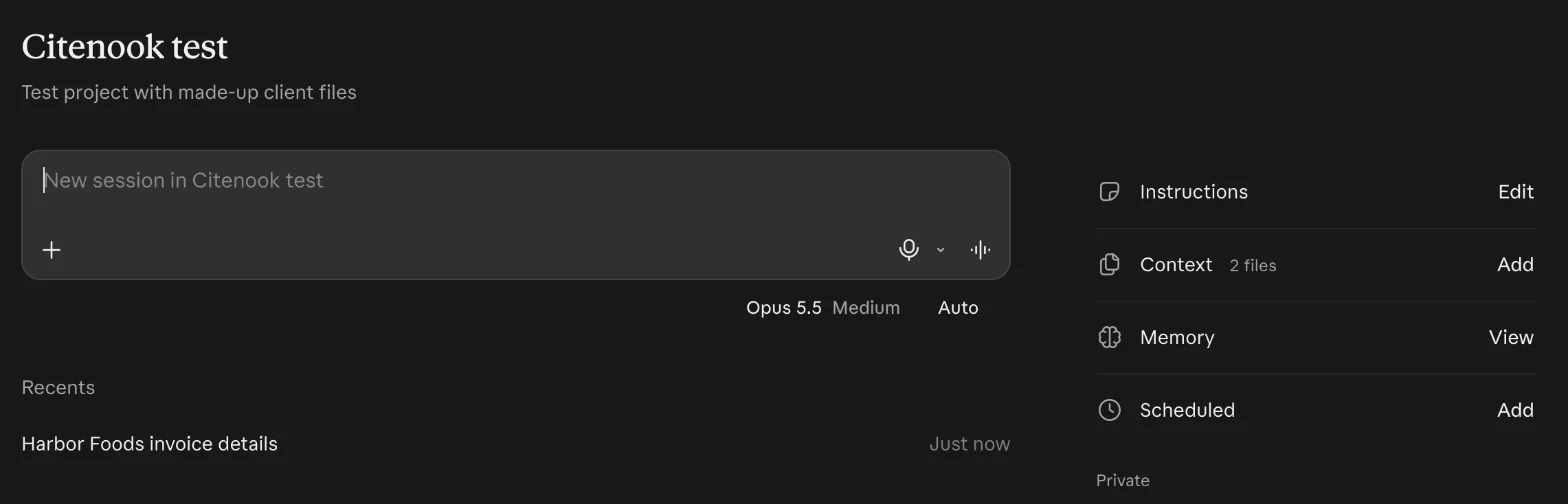
- Context: select Add and upload files. Everything here is used in every chat inside the project.
- Instructions: select Add (or Edit), write how Claude should behave, and save. Claude follows them in every chat in the project.
Older guides, and Anthropic's own help page, call these "project knowledge" and "Set project instructions". The buttons we saw were named Context and Instructions.
Good instructions are short and specific. Ours was: "You help me manage client accounts. Answer briefly and name the file each fact comes from." Anthropic suggests keeping them short: general context, key rules and Claude's role.
What happened when we tested it
We uploaded two made-up text files: notes from a client call and an invoice for the same client. Then we asked when the invoice was due, how much it was, and whether the client asked for any changes.
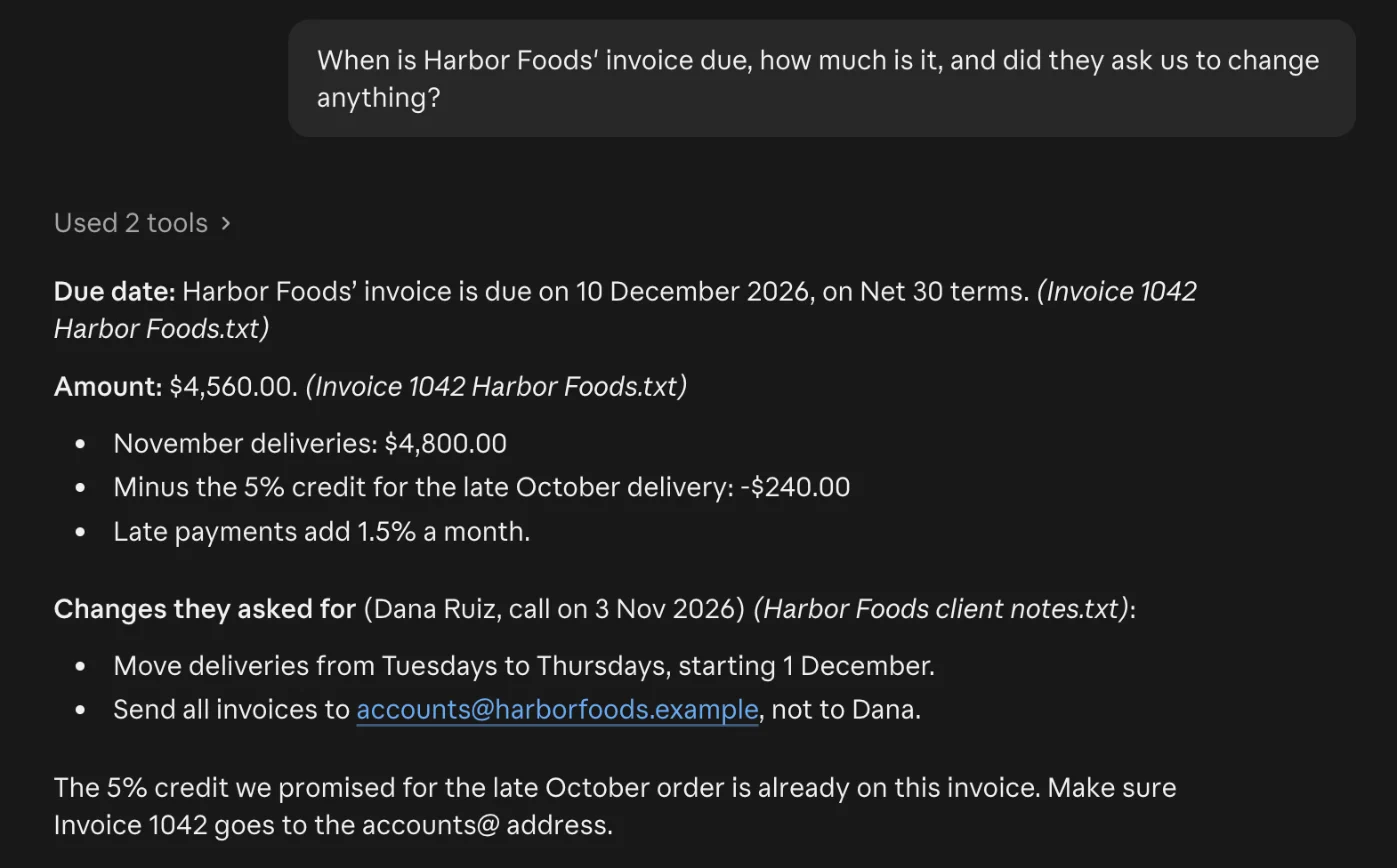
Every fact was right, and Claude pulled facts from both files together. It showed "Used 2 tools", which were "Read Invoice 1042 Harbor Foods.txt from the project" and the same for the notes file. It named a file after each fact only because our instructions asked it to. It didn't quote the sentence each fact came from, so checking it meant opening the files ourselves.
File types and limits
| Project files | Files in a normal chat | |
|---|---|---|
| Size per file | 30 MB | 500 MB |
| Number of files | No set number, but it must fit Claude's memory limit (see below) | 20 per chat |
| What Claude reads | Text only (Anthropic lists some PDFs as an exception) | Text, and images in PDFs up to 100 pages |
Supported files include PDF, Word (DOCX), CSV, TXT, HTML, RTF, EPUB, JSON and Excel, plus JPEG, PNG, GIF and WebP images. Excel needs code execution turned on in settings. Apple Pages and Keynote files aren't on the list, so export them to PDF or Word first.
How much fits? On Free, all the files together must fit in Claude's context window, the amount of text it can read at once. On paid plans, when a project gets close to that limit, Claude switches to searching the files for the relevant parts instead of reading them all. Anthropic says this holds "up to 10x" more. You can't turn it on or off yourself. Anthropic's tips for big projects: give files clear names, and name the file you mean in your question.
For a sense of scale, Anthropic says the 200K-token window on older models is "about 500 pages of text or more", and its newest models in chat read up to 1M tokens.
How memory works in a project
Each project has its own memory. In a project, Claude uses that project's memory plus your memory from chats outside projects, but not memory from other projects.
It also works the other way: what Claude remembers inside a project can show up in your chats outside projects. To stop that, open Memory on the project's page and turn off Use account memory. In our account it was on by default. Turn this off for client work, so one client's details don't appear in an unrelated chat.
One more thing Anthropic points out: chats in the same project don't share what you typed in them. If something matters to every chat, put it in a file or the instructions.
Sharing a project
Sharing is only on Team and Enterprise plans. Select Share project next to the name, add people by name or email, and pick Can view (they can chat but not change anything) or Can edit (they can change files, instructions and members). Admins can turn sharing off for the whole organization. On Free, Pro, Max and Ultra, a project is only yours.
Which plans have Projects, and what they cost
| Plan | Price | Projects |
|---|---|---|
| Free | $0 | Up to 5, no extra space for large projects |
| Pro | $20 a month, or $17 a month paid yearly | As many as you like, with extra space |
| Max | $100 a month | Same as Pro, more usage |
| Ultra | $200 a month | Same as Pro, more usage |
| Team and Enterprise | Per seat | Same, plus sharing |
Prices are from claude.com/pricing and don't include tax. Big projects use up your usage limit faster, because Claude reads more text for each answer.
The new version of projects (beta)
Anthropic is rolling out a new kind of project, starting in Claude Code for some Pro, Max and Ultra users. In it, a project is one long conversation, and Claude splits the work into tasks that keep running in the cloud even when your laptop is closed. Some existing projects have already been moved, and Anthropic says "Nothing is lost or deleted in the move." Chat, Team and Enterprise get it later. Everything else in this guide is about the current version most people have.
Is it safe to put client files in a Claude project?
Project files go to Anthropic's servers, like anything else you send Claude. On Free, Pro, Max and Ultra, your chats can be used to train Claude unless you turn off the training setting, and they're kept for up to 5 years if it's on. With it off, chats you delete are removed from Anthropic's systems within 30 days. Incognito chats aren't available inside projects. Our guide to whether Claude is safe has the settings and the details.
For health records, see is Claude HIPAA compliant: only certain plans with a signed agreement are covered. And if you connect apps like Google Drive, those work differently from uploaded files. Our Claude connectors guide explains how.
Tips that make projects work better
- One project per client, case or course, so answers don't mix.
- Name files clearly ("2026-11 Harbor Foods invoice.pdf", not "scan3.pdf").
- Ask Claude to name the file behind each fact, then spot-check.
- Delete old versions of a file, so Claude doesn't answer from the outdated one.
- Turn off "Use account memory" for anything confidential.
When the files shouldn't leave your Mac
Claude Projects are a good fit when uploading is fine. When it isn't, Citenook does a similar job on your Mac. You point it at a folder of PDFs, Word files and notes, and ask questions about them. With a model that runs on your Mac, the files, questions and answers stay on the Mac. Each answer shows the exact sentence it came from, which is the check our Claude test left us to do by hand. See what goes where.
It has limits. Models that run on a Mac are smaller than Claude's best models, so answers can be simpler, and there's no team sharing. If you connect an online AI instead, that company receives your question and the passages used to answer it. Citenook runs only on Macs with Apple silicon and macOS 15 or later. It's free for 30 days, then from $9.99 a month.
Questions
Are Claude Projects free?
Yes, with a limit. Free accounts can create up to five projects. Paid plans have no project limit and can hold far more files per project.
How many files can a Claude project hold?
There's no set number. Each file can be up to 30 MB, and together they must fit Claude's context window. On paid plans, large projects switch to searching the files, which holds up to 10 times more.
Can Claude Projects remember past chats?
Each project has its own memory, and Claude can use it in later chats in the project. But what you type in one chat isn't shared with other chats unless you add it to the files or instructions.
Can I share a Claude project with someone?
Only on Team and Enterprise plans, with view or edit access. On personal plans, projects are private to you.
How do I delete a Claude project?
Open the project, open the menu next to its name, select Delete and confirm. It deletes all the project's chats too, and can't be undone. Archived projects have to be unarchived first.
Are Claude Projects the same as ChatGPT Projects?
They're similar ideas: files, instructions and chats grouped together. The limits, memory settings and plans differ, so check each one's help pages.
Sources, checked 13 November 2026: Anthropic What are projects?, How can I create and manage projects?, RAG for projects, Upload files to Claude, context window on paid plans and pricing. The screenshots are from a test project in our own Claude account with made-up files, deleted afterwards.