 Citenook1
Blog · Guides
How to chat with 1,000 PDFs offline on a Mac
To chat with 1,000 PDFs offline on a Mac, you need two things that both run on your Mac: an app that reads and searches the PDFs, and an AI model that writes the answer. Citenook does both. Add the folder, pick a model on your Mac, and ask. Nothing is uploaded, and every answer links to the exact sentence it came from.
This guide explains how it works, what Mac you need, how to set it up step by step, and how to get good answers from a large library. It also covers other ways to do it, including free ones.
What "offline" really takes
Most "chat with your PDF" tools upload your files to a server. Working offline means every step has to happen on your Mac instead:
- Reading. The app pulls the text out of each PDF, page by page. Scanned pages without a text layer need text recognition, which macOS can do on your Mac.
- Indexing. The text is split into passages and stored in a search index on your disk, so the app can find the right passages in a second instead of rereading every file.
- Searching. When you ask a question, the app finds the passages most likely to answer it, by matching words and by matching meaning.
- Answering. A language model reads those passages and writes a short answer. To stay offline, this model has to run on your Mac too.
If any one of these steps uses the internet, your files, or parts of them, leave your Mac. That's fine for some documents and not for others, such as contracts, client files, medical records or anything under a confidentiality agreement.
What you need
- A Mac with Apple silicon (M1 or later). Citenook needs macOS 15 or later.
- Memory for the model. Models that run on your Mac work best with 16 GB of memory or more. With 8 GB, Apple Intelligence is the better choice for answers on your Mac.
- Disk space. A downloaded model takes a few gigabytes. The search index is much smaller than the PDFs themselves.
- Time for the first read. Reading 1,000 PDFs takes a while the first time, longer for scanned pages. After that, only new or changed files are read again.
Step by step with Citenook
1. Get your free key and install
Choose Start free on this site and enter your email. No card is needed. Download Citenook from the page that shows your key, drag it to Applications, open it and paste the key. Your 30-day free month starts then.
2. Make a brain and add the folder
A brain is a set of files you ask questions about. Make one with New Brain, choose Add Source, and pick the folder with your PDFs. Subfolders are included. Citenook keeps the folder up to date: drop a new PDF in, and it's read on its own.
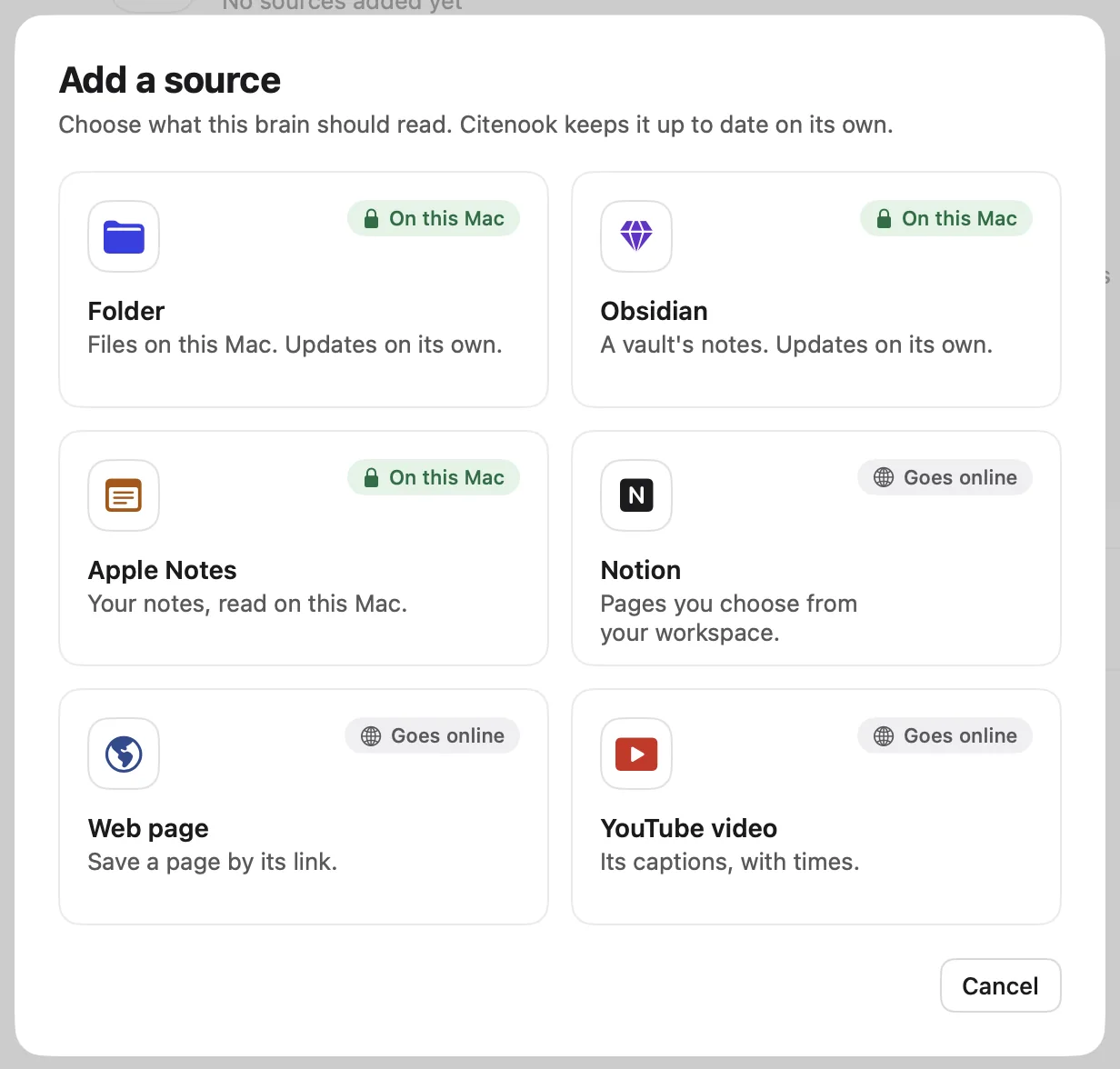
With 1,000 PDFs on many topics, think about splitting them into a few brains, one per client, project or subject. Answers then stay on topic, and you can still ask across all of them by putting the brains in a group. Note that the Standard plan holds 3 brains and 1,000 files; Pro and Pro+ have no limit.
3. Choose a model on your Mac
Open Settings → Answers. For fully offline answers, pick one of these as the default model:
- Apple Intelligence, if it's turned on in your Mac's settings. Nothing to download.
- A downloaded model. Choose one from the list and download it once. Citenook shows which ones suit your Mac's memory.
- Ollama or LM Studio, if you already run them (Pro and Pro+).
You can switch models per chat later, for example to an online AI with your own key for one hard question, and back.
4. Let it read
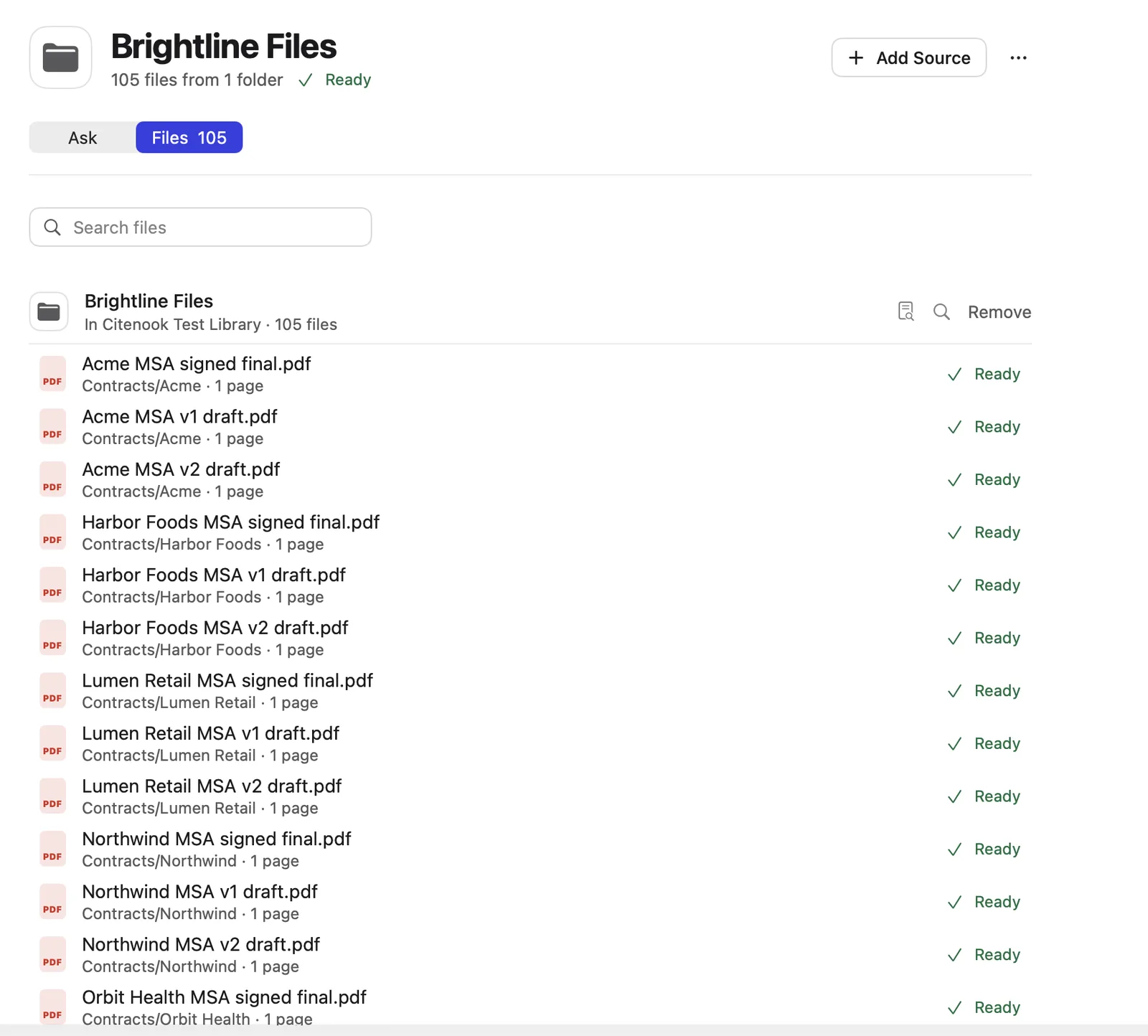
Citenook shows how many files are read and which ones couldn't be. You can start asking before it finishes; answers then come from the files read so far. A PDF that can't be read, such as one with a password, is listed with the reason.
5. Ask, then check
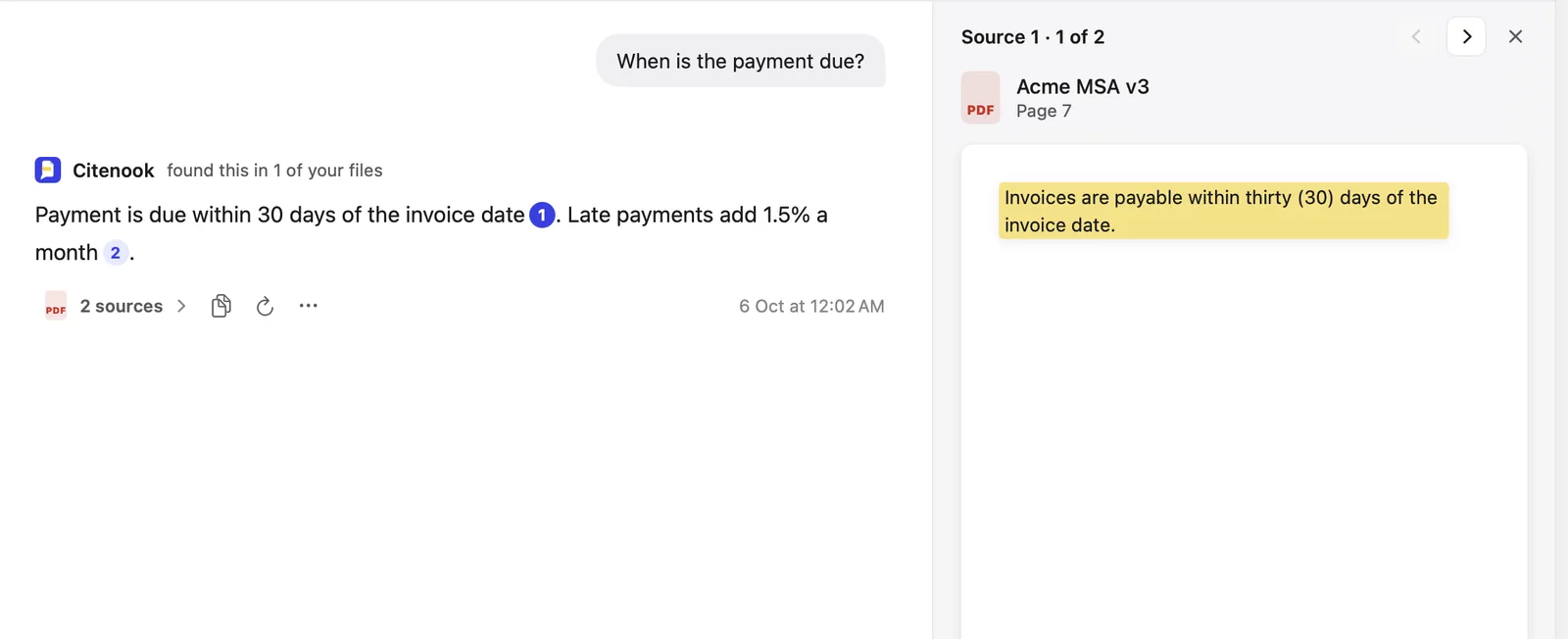
Ask in plain words, as you'd ask a colleague: "What is the notice period in the Blue Harbor contract?" Each fact in the answer has a small number. Click it, and the PDF opens at that page with the exact sentence highlighted. If your files don't cover the question, Citenook says so instead of guessing.
How to get good answers from 1,000 PDFs
- Ask specific questions. "What did the 2025 audit say about inventory counts?" finds better passages than "tell me about audits".
- Name the document when you know it. Mentioning a file, company or date narrows the search.
- Use Deep answer for questions across many files. "Which contracts allow early termination?" needs passages from many PDFs. Deep answer searches several times before it writes (Pro and Pro+).
- Pin the documents that matter. Open a key PDF from an answer and choose Always Include in Answers, so every answer in that brain reads it.
- Check scanned pages. Text recognition can misread faint or handwritten text. Click through to the page before relying on a number.
- Expect less from small models. Models on your Mac are good at finding and quoting. For long, nuanced analysis, a large online model writes better. Citenook lets you choose per chat, and can hide names, emails and ID numbers before anything is sent.
Honest limits
- Summaries of everything. A model can only read a limited amount of text at once. "Summarize all 1,000 PDFs" gives a broad overview, not a careful read of each one. Ask about a topic, a folder or a document instead.
- Languages. Words are matched in any language, but search by meaning works best in English for now.
- Speed on older Macs. On an M1 with 8 GB, a downloaded model answers slowly. Apple Intelligence or an online AI is faster there.
Other ways to do it
Citenook isn't the only option. Here's how the common alternatives compare for this job:
- Gemini Notebook (formerly NotebookLM) is free and cites passages well, but it runs in Google's cloud, so your PDFs are uploaded and it doesn't work offline. Its free plan allows 50 sources per notebook. See Citenook vs Gemini Notebook.
- AnythingLLM is free, open source and can run fully offline on Mac, Windows and Linux. It gives you more to set up and tune, such as the embedder and vector database. See Citenook vs AnythingLLM.
- A do-it-yourself setup with Ollama and a script works if you code, but you'll build the reading, search and citations yourself.
Choose Citenook if you want it to work in a few minutes on a Mac, keep folders up to date on their own, and show the exact sentence behind every answer.
Questions
Can I really chat with 1,000 PDFs without internet?
Yes. With Apple Intelligence or a model you downloaded in Settings, Citenook reads, searches and answers on your Mac with Wi-Fi off. Only adding web pages or YouTube videos needs a connection.
How much memory do I need?
16 GB or more for models that run on your Mac. With 8 GB, use Apple Intelligence, or an online AI with your own key.
Does it read scanned PDFs?
Yes. Pages without a text layer are read with your Mac's text recognition. Check important figures against the page.
Are my PDFs uploaded anywhere?
No. They're read and searched on your Mac. With an online AI, only your question and the passages picked to answer it are sent, straight to the service you chose.
What does it cost?
Free for 30 days with every feature and no card. Then $9.99, $19.99 or $29.99 a month. See pricing.