 Citenook1
Blog · Privacy
Claude incognito mode: how to use it, what it skips, and what Anthropic keeps

Claude's incognito mode starts a chat that isn't saved to your history, doesn't use or add to Claude's memory, and isn't used to train Claude. To start one, click the ghost icon at the top right of a new chat. It isn't fully private: Anthropic keeps incognito chats for 30 days by default, and on Team and Enterprise plans, account owners can export them.
This guide covers how to turn incognito on, what it skips, what Anthropic still keeps, what you can't do in it, and how it compares with turning memory off and with ChatGPT and Gemini. Facts come from Anthropic's own help and privacy pages, checked on 15 November 2026. We also tested it in our own Claude account with a made-up question.
How to turn on incognito mode in Claude
Anthropic gives one set of steps for the website and the apps:
- Start a new chat. It has to be outside a project.
- Click the ghost icon in the upper right corner.
- Check that the chat now has a border and an "Incognito" label at the top left.
- Type your message.
- When you're done, click the x at the top right to close it.
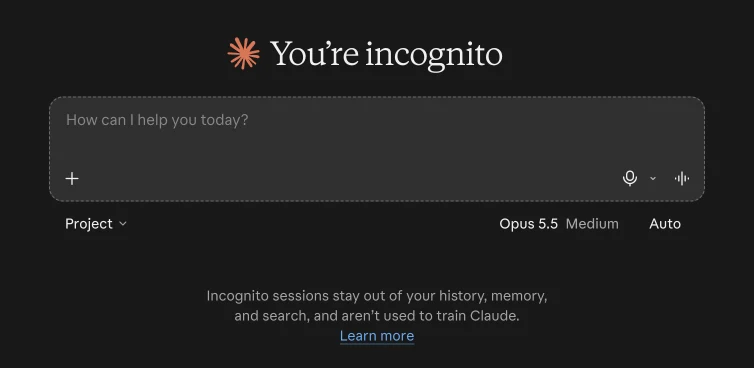
Inside a project, the ghost icon doesn't appear. Anthropic says incognito "is currently only available for chats outside of projects."
What incognito skips
| Incognito chat | |
|---|---|
| Your chat history | Not saved |
| Claude's memory | Doesn't use it and doesn't add to it |
| Search across past chats | Left out |
| Monthly recap | Left out |
| Training Claude | Not used, even if "Help improve Claude" is on |
| Your profile preferences and styles | Still used |
On training, Anthropic's privacy page says incognito chats "are not used to improve Claude, even if you have enabled Model Improvement in your Privacy Settings." The same pages add a general exception: if safety systems flag a conversation, it "may still be used" to improve Anthropic's safety models. They don't say whether that applies to incognito chats.
One more reason people use it: deleting a normal chat later doesn't remove memories Claude already made from it. Anthropic says memory entries generated from a deleted chat "aren't removed." An incognito chat never makes them in the first place.
Does Claude save incognito chats?
Not to your account, but Anthropic keeps a copy. Its incognito page says the chats "are retained for either 30 days (default), or longer in accordance with your organization's custom data retention setting (available for Enterprise plans)."
- 30 days isn't a countdown to the minute. Anthropic's pages word it three ways: "retained for 30 days," "automatically deleted within 30 days unless flagged," and "retained for at least 30 days for safety purposes." Treat it as about a month.
- Flagged chats can stay longer. For chats flagged as breaking its usage policy, Anthropic says it keeps inputs and outputs "for up to 2 years." It may also keep chats "as required by law" or to resolve disputes.
- Who can read it. By default, Anthropic employees can't access your conversations. The exceptions are feedback you choose to send and safety reviews, where only "designated members of our Trust & Safety team" may look. This is Anthropic's general rule, not an incognito-only promise.
So incognito keeps a chat out of your account and out of training. It doesn't keep it off Anthropic's servers. For what Claude does with regular chats, see is Claude safe.
Can my employer see my incognito chats?
On a Team or Enterprise plan, yes, through exports. Anthropic says: "Incognito chats are included in organizational data exports available to account Owners." On Enterprise, they're also included in the Compliance API, the tool companies use to pull chats into their own records. They don't show up in your coworkers' chat lists, and they follow your company's retention policy, which can be longer than 30 days.
On a personal Free, Pro, Max or Ultra account there's no admin, so this doesn't apply.
What you can't do in an incognito chat
- Save it later. "Once you start an incognito chat, it cannot be converted to a regular chat or saved to your history." ChatGPT lets you save a temporary chat; Claude doesn't.
- Reopen it from your history. "Once closed, incognito chats cannot be reopened." Copy anything you need before you click the x. In our test, the closed chat never showed up in our chat list, but opening its web address again right after closing brought the whole chat back. So closing hides it; it doesn't erase it.
- Use it in a project. The ghost icon only appears outside projects.
- Create files or run code, in the new Claude experience. Anthropic is rolling out a new version of the Claude app to Pro, Max and Ultra users. There, incognito chats "open in the previous chat experience, so Claude can't create files or run code in them."
What we saw when we tried it
Anthropic's pages don't say which tools work in incognito, so we checked on the web with a made-up question about a rent increase:
- Tools still work. Claude searched the web for its answer. The "+" menu still offered file uploads, skills, connectors, plugins and research. The memory switch wasn't there.
- No thumbs, no share. Under the answer there were only Copy, Read aloud and Retry. That matters: when you rate a normal answer, Anthropic keeps the whole conversation for up to 5 years and may use it for training. In incognito the buttons aren't offered.
- It still knew roughly where we were. The answer was tailored to our city. Incognito skips your history and memory, but it doesn't hide your location.
- A reminder under the box: "No history, memory, or Claude training."
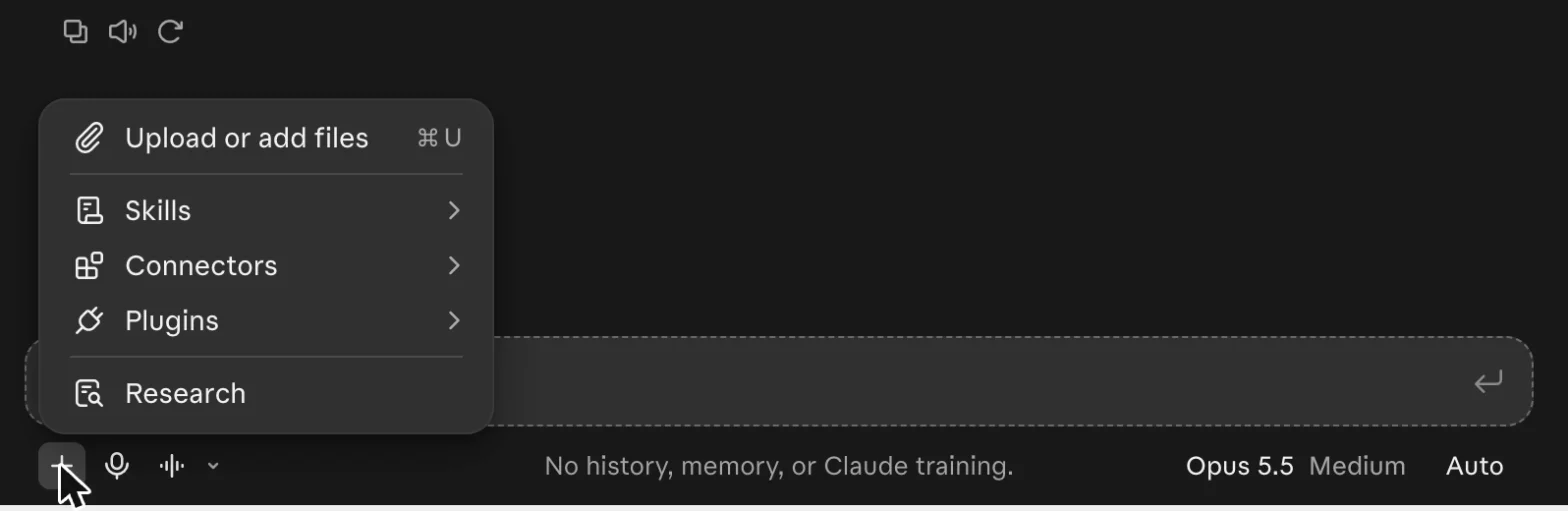
Connectors and plugins send data to the services they connect to, and those services have their own rules. Keep that in mind before you use them in a chat you meant to keep private.
Incognito vs turning memory off for one chat
If you only want Claude to ignore its memory but still keep the chat, there's a second option: turn off "Memory" in the "+" menu before your first message. That also works inside projects.
| Incognito chat | Memory off for one chat | Normal chat | |
|---|---|---|---|
| In your history | No | Yes | Yes |
| Uses or adds memory | No | No | Yes, if memory is on |
| Found by chat search | No | Yes | Yes |
| Used for training | No | Your setting | Your setting |
| Works in projects | No | Yes | Yes |
Memory itself is now on by default for Free, Pro, Max and Ultra. You can change it in Settings under "Your Claude." Our guide to Claude Projects explains how project memory differs.
Claude incognito vs ChatGPT and Gemini temporary chats
| Claude incognito | ChatGPT Temporary Chat | Gemini temporary chat | |
|---|---|---|---|
| In your history | No | No, unless you save it | No |
| Used for training | No | No | No |
| Copy kept for | 30 days by default | Up to 30 days | 72 hours |
| Can be saved later | No | Yes | No |
Google keeps temporary chats the shortest time. ChatGPT is the only one that lets you change your mind and save the chat. Details for ChatGPT are in our ChatGPT Temporary Chat guide.
When to use incognito, and when not to
Use it for one-off questions you don't want in your history or in Claude's memory: a health worry, a gift idea, a sensitive draft you'll throw away. It's also handy when you want an answer that doesn't lean on what Claude already knows about you.
Don't treat it as a safe place for client files, patient notes or anything under an NDA. The text still goes to Anthropic, a copy stays for about a month, and on a work account your employer can export it. Incognito hides a chat from your account, not from the company running the AI. If you work with health data, see is Claude HIPAA compliant.
When the files shouldn't leave your Mac
Citenook is a Mac app for those files. It answers questions from your PDFs, Word files and notes, and with a model running on the Mac, the files, questions and answers stay on the Mac and it works with Wi-Fi off. Each answer shows the exact sentence it came from. See what goes where.
It has limits. Models that run on a Mac are smaller than Claude's best models, so answers can be simpler. If you connect an online AI instead, that company receives your question and the passages used to answer it. Citenook runs only on Macs with Apple silicon and macOS 15 or later. It's free for 30 days, then from $9.99 a month.
Questions
Does Claude have an incognito mode?
Yes. Click the ghost icon at the top right of a new chat outside a project. It's available on Free, Pro, Max, Ultra, Team and Enterprise plans.
Is Claude incognito private?
More private than a normal chat, not fully. It's not saved to your history, memory or training, but Anthropic keeps it for 30 days by default, and on work plans account owners can export it.
Are Claude incognito chats used for training?
No. Anthropic says they aren't used to improve Claude, even if your training setting is on. In our test, incognito chats didn't offer the thumbs up or down buttons, which can send a normal chat for training.
Can I recover a closed incognito chat?
Not from your history. It can't be saved while it's open and doesn't appear in your chat list after you close it. In our test its web address still opened it right after closing, but don't count on that. Copy what you need first.
Does incognito work in Claude Projects?
No. The ghost icon only appears outside projects. Inside a project, you can turn off "Memory" in the "+" menu for one chat instead, but that chat stays in your history.
Is Claude incognito free?
Yes. It's included on every plan, including Free.
Sources, checked 15 November 2026: Anthropic Use incognito chats, Claude's memory, the new Claude experience, Is my data used for model training?, How long do you store my data?, How long do you store my organization's data?, How does Anthropic protect the personal data of Claude users? and privacy policy; OpenAI Temporary chat in ChatGPT; Google Gemini Apps Privacy Hub. Screenshots are from our own Claude account with a made-up question, with the answer cropped out. This isn't legal advice.