 Citenook1
Blog · Privacy
ChatGPT Temporary Chat: what it skips, what it keeps, and how to use it
ChatGPT's Temporary Chat keeps a conversation out of your history, doesn't create memories, and isn't used to train OpenAI's models. It isn't fully private: OpenAI may keep a copy for up to 30 days for safety, and a Personalized temporary chat can still use your memories. To start one, open a new chat, select Temporary, and pick Personalized or Unpersonalized before your first message.
This guide covers how to start a temporary chat, what the two modes change, what OpenAI keeps, how saving works, what happened with the New York Times court order, and how Claude and Gemini compare. Facts come from OpenAI's, Anthropic's and Google's own pages, checked on 9 November 2026. We also tested it in our own ChatGPT account with a made-up message.
How to start a temporary chat in ChatGPT
OpenAI gives the same steps for the website and the apps:
- Open a new chat.
- Select Temporary. On the website it's a small dashed-circle button at the top right of a new chat.
- Choose Personalized or Unpersonalized from the menu at the top. Do it now: OpenAI says "You cannot change personalization after the conversation starts."
- Type your message. The chat is labeled "Temporary chat" at the top.
On the website, the address chatgpt.com/?temporary-chat=true also opened a temporary chat for us. OpenAI doesn't document that link, so check the label before you type.
Personalized or Unpersonalized: what's the difference?
Since August 2026, a temporary chat can either use your settings or ignore them. Neither mode creates or updates memories, and neither is used for training while the chat stays temporary.
| Personalized | Unpersonalized | |
|---|---|---|
| Uses your existing memories | Yes | No |
| Follows your custom instructions | Yes | No |
| Can use plugins | Yes | No |
| Creates new memories | No | No |
| Appears in your history | No, unless you save it | No, unless you save it |
| Used to train OpenAI's models | No, while it stays temporary | No, while it stays temporary |
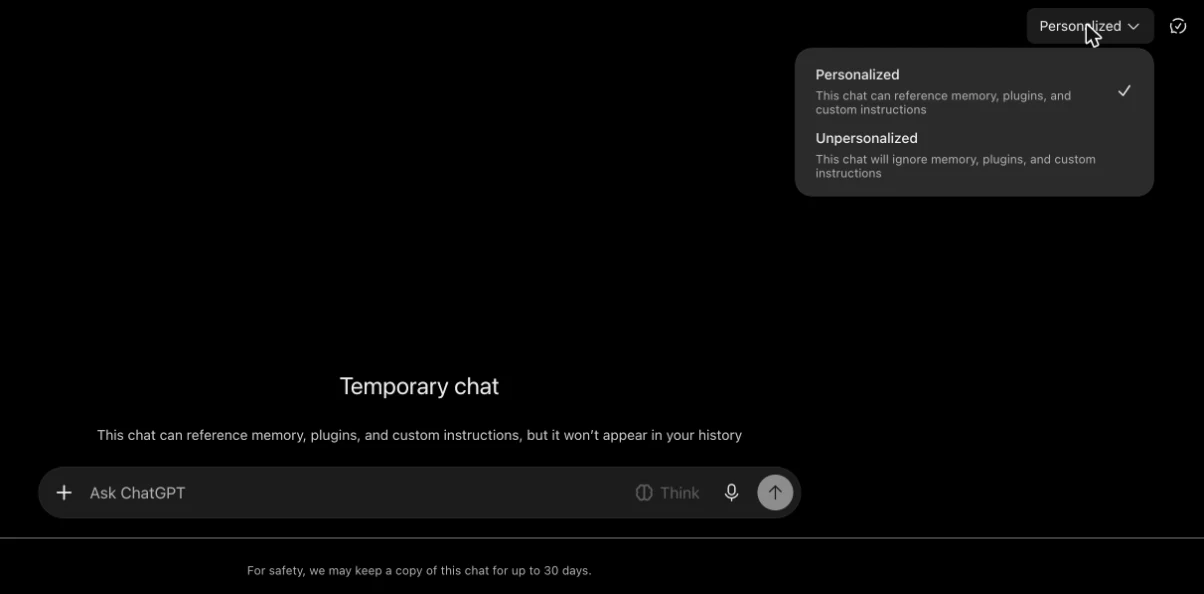
Which one is the default? OpenAI's own pages disagree. Its August 2026 release note says temporary chats aren't personalized by default, while its Projects help page says personalization is on by default and ChatGPT remembers your last choice. In our account it opened as Personalized. So check the menu every time. If you don't want ChatGPT to use what it knows about you, pick Unpersonalized.
Does ChatGPT save temporary chats?
Not to your account, but OpenAI keeps a copy for a while. Here's what happens:
- History: the chat doesn't appear in your sidebar or search. In our test it never showed up in Recents.
- Memory: no new memories are made, in either mode.
- Training: not used to improve OpenAI's models, "whether or not you choose personalization."
- The 30-day copy: OpenAI says it "may keep a copy of a temporary chat for up to 30 days for safety purposes." ChatGPT shows the same line under every temporary chat. OpenAI's privacy policy says temporary chats are deleted within 30 days unless they have to be kept "for safety or legal reasons."
OpenAI doesn't say who can read that 30-day copy. It also says that even with personalization off, ChatGPT "may still use information from prior conversations for limited safety and security purposes" in rare, high-risk situations. So a temporary chat is less tracked, not invisible. For what happens in regular chats, see whether ChatGPT is confidential.
Can you save or recover a temporary chat?
You can save it while it's open. After our first message, ChatGPT offered a "Save chat" option to move it into our history:

Saving turns it into a regular chat. From then on it follows your normal settings: it can be used for training if "Improve the model for everyone" is on, and it can shape future answers if Memory is on. Uploaded files may also be saved to your Library.
If you don't save it, it's gone for you once you leave. OpenAI says it "cannot be reopened from history after you leave it." When we opened the chat's link again after leaving, ChatGPT said we didn't have access to the conversation. There's no way to get it back, so copy anything you need before you close it.
GPTs, files, projects and work accounts
- GPTs: "You can use temporary chat with GPTs." But if a GPT sends data to another company through an action, that company "may retain that data for longer than 30 days."
- Projects: you can't add a chat to a project while it's temporary. Save it first.
- Files: you can upload files. They're kept out of your Library unless you save the chat.
- Work accounts: on Business, Enterprise and Edu, your workspace's rules come first: "Your account and workspace restrictions take priority." For Enterprise, temporary chats stay available to the company's compliance tools for 30 days.
Are temporary chats still kept because of the New York Times case?
Not anymore, for new chats. In 2025, a US court in the New York Times copyright case ordered OpenAI to preserve consumer ChatGPT data it would normally delete. OpenAI says "Our obligations under the earlier order ended on September 26, 2025," and that "Deleted ChatGPT conversations and Temporary Chats will be automatically deleted from our systems within 30 days." The court's order ending the duty was filed on 9 October 2025.
One exception remains: OpenAI is still holding a limited set of user data from April to September 2025, which it says is locked down and only accessible to a small legal and security team. Many articles from 2025 still say temporary chats are kept forever. That was never OpenAI's normal practice and no longer applies to new chats.
ChatGPT Temporary Chat vs Claude and Gemini
| ChatGPT Temporary Chat | Claude incognito chat | Gemini temporary chat | |
|---|---|---|---|
| In your history | No, unless saved | No | No |
| Used for training | No | No | No |
| Copy kept for | Up to 30 days | 30 days by default | 72 hours |
Google keeps temporary chats the shortest time. Anthropic says Enterprise plans can keep incognito chats longer under a company's own retention setting. More detail is in is Claude safe and is Gemini safe.
When to use Temporary Chat, and when not to
Use it for one-off questions you don't want in your history or shaping ChatGPT's memory: a health worry, a gift idea, a draft you'll throw away. Pick Unpersonalized when you want an answer that doesn't lean on what ChatGPT knows about you. If you want ChatGPT to stop remembering things in general, see how ChatGPT memory works.
Don't treat it as a safe place for client files, patient notes or anything under an NDA. The text still goes to OpenAI's servers, and a copy can stay for up to 30 days. Temporary means "not in your account," not "never left your computer."
When the files shouldn't leave your Mac
Citenook is a Mac app for those files. It answers questions from your PDFs, Word files and notes, and with a model running on the Mac, the files, questions and answers stay on the Mac and it works with Wi-Fi off. Each answer shows the exact sentence it came from. See what goes where.
It has limits. Models that run on a Mac are smaller than ChatGPT's best models, so answers can be simpler. If you connect an online AI instead, that company receives your question and the passages used to answer it. Citenook runs only on Macs with Apple silicon and macOS 15 or later. It's free for 30 days, then from $9.99 a month.
Questions
Is ChatGPT temporary chat private?
More private than a regular chat, not fully. It stays out of your history and isn't used for training, but OpenAI may keep a copy for up to 30 days for safety, and a Personalized one can use your memories.
Does temporary chat use my memory?
A Personalized one can use your existing memories and custom instructions. An Unpersonalized one can't. Neither creates new memories.
Can I recover a temporary chat after closing it?
No. Once you leave an unsaved temporary chat, it can't be reopened. Save it before you leave if you might need it.
Is temporary chat available on the free plan?
OpenAI's help page doesn't limit it to paid plans. Our test used a Go account. On work accounts, your admin's settings come first.
Is temporary chat the same as incognito mode?
It's similar: it stays out of your history. But unlike a browser's incognito mode, the conversation still goes to OpenAI, which may keep it for up to 30 days.
Are temporary chats used to train ChatGPT?
No, not while they stay temporary, in either mode. If you save one, your normal "Improve the model for everyone" setting applies.
Sources, checked 9 November 2026: OpenAI Temporary chat in ChatGPT, ChatGPT release notes, Projects in ChatGPT, Data controls, privacy policy and response to the New York Times' data demands; the court's stipulation and order of 9 October 2025 in In re OpenAI, Inc. Copyright Infringement Litigation, 25-md-03143 (S.D.N.Y.); Anthropic Use incognito chats; Google Gemini Apps Privacy Hub. Screenshots are from our own ChatGPT account with a made-up message, with the sidebar removed. This isn't legal advice.