 Citenook1
Blog · Privacy
ChatGPT memory: what it remembers, and how to turn it off or delete it
ChatGPT memory lets it carry details from one chat into the next: things you ask it to remember, a summary it keeps updating, and what it picks up from past chats, Library files and a connected Gmail. To turn it off, open Settings, then Personalization, and switch off Enable memory. Turning it off or deleting a chat doesn't erase everything, though. You have to delete the memories themselves, and for client work, use an unpersonalized Temporary Chat or a project with project-only memory.
OpenAI rebuilt memory in June 2026, so many guides still show old menus. Everything here comes from OpenAI's help center and release notes, checked on 26 October 2026. For the wider question of what OpenAI keeps, read is ChatGPT confidential?
What ChatGPT memory remembers
There are two parts, and you can switch each one off:
- Saved memories: in OpenAI's words, "details that you explicitly ask ChatGPT to remember or that ChatGPT saves as useful context."
- Chat history: what ChatGPT picks up from your past chats. OpenAI says this "can change as ChatGPT updates what is most useful to remember."
Since June 2026, accounts that have the new improved memory get a memory summary that "continually updates," instead of the old list of separate memories. The old list is still there as "legacy saved memories," and you can switch back to it.
Memory can draw on more than chats. Depending on your plan and region, OpenAI lists past chats, saved memories, custom instructions, "files in Library" and "content from connected apps, such as Gmail." So a contract saved to your Library, or a connected inbox, can shape what ChatGPT says in other chats.
What about "memory full"? Since October 2025, ChatGPT ranks saved memories automatically, keeping the most relevant ones and moving the rest to the background, which OpenAI says "helps avoid 'memory full' state." OpenAI doesn't publish a maximum number of memories, so guides that quote a fixed limit are guessing or out of date.
How to see what ChatGPT remembers
- Ask it. OpenAI says you can "ask ChatGPT what it remembers about you."
- Open the memory summary: Settings, Personalization, then Manage next to Memory summary. It's a high-level view that "may omit details," so it isn't a full record.
- Check the sources under an answer. An icon shows what personalized the reply, though OpenAI says it "may not show every factor."
How to turn off ChatGPT memory
- Open Settings and select Personalization.
- Find the ChatGPT memory section.
- With the new improved memory, turn off Enable memory. On accounts that still have the older layout, turn off Reference saved memories, Reference chat history, or both; turning off saved memories also turns off chat history.
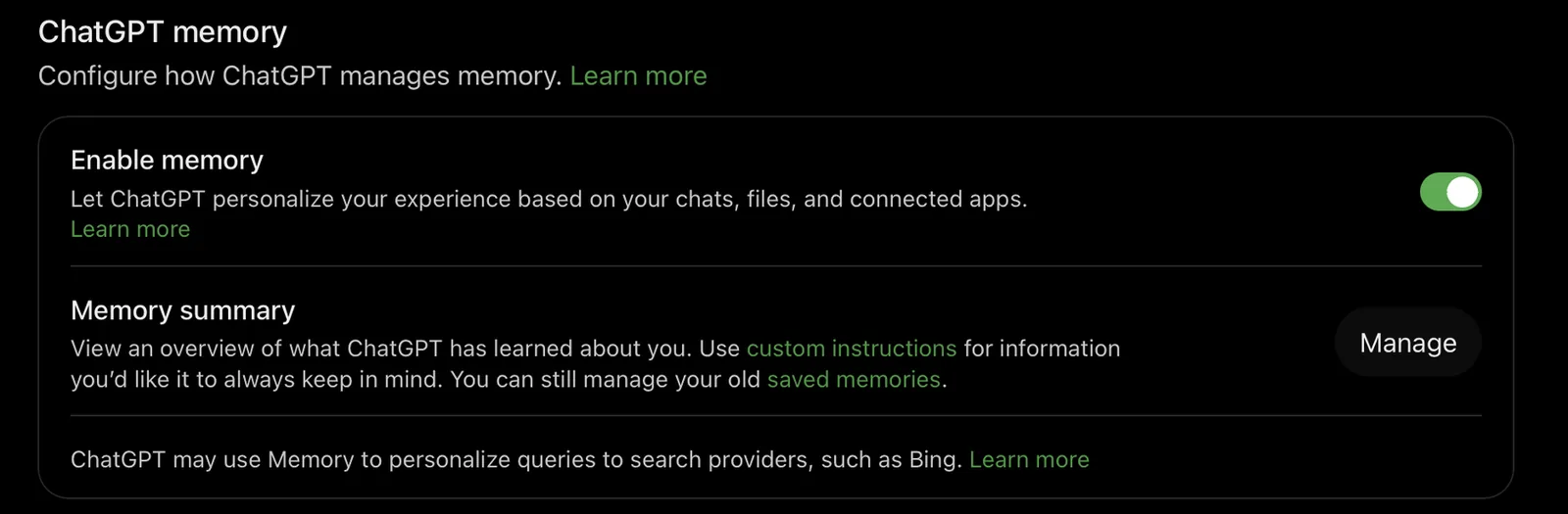
On our account, the switch says it personalizes ChatGPT "based on your chats, files, and connected apps," and a note below it says memory may also shape queries sent to search providers such as Bing. The names vary by account: OpenAI lists "Memory, Reference saved memories, Reference chat history, Memory summary, Manage, or Saved memories," and says some may not be available to you yet.
Turning a switch off is not the same as deleting. When you turn off chat history, OpenAI says what it learned from past chats "is scheduled for deletion from OpenAI systems within 30 days," but that doesn't delete your saved memories. To clear memory and switch it off in one go, use Delete and turn off memory in the memory summary's three-dot menu (on the web; mobile is rolling out). This keeps your past chats.
How to delete ChatGPT memories
- One memory: ask ChatGPT to forget it, or delete it in Memory settings.
- Deleting a chat isn't enough. OpenAI: "Deleting a chat alone does not necessarily delete a separate saved memory created from that chat."
- Deleting a memory leaves the chat. It stops future use, "but it does not remove mentions of that information from past conversations."
- Everything about one topic: delete the memory, the chats that mention it (archived ones too), any files in Library, and any connected app that holds it.
Even then, OpenAI "may retain logs of deleted saved memories for up to 30 days for safety and debugging purposes," and changes can take time to apply.
Temporary Chat: no longer always memory-free
Many guides say Temporary Chat never uses memory. Since 27 August 2026, that's only true for one of its two modes. When you start a Temporary Chat, you now choose before the first message:
| Mode | Uses memories | Saves new ones | Training |
|---|---|---|---|
| Un | No | No | Not used |
| Personalized | Yes | No | Not used |
You can't change the mode once the chat starts, and OpenAI's own pages disagree on which one is the default, so check the choice every time. Either way, OpenAI "may keep a copy of a temporary chat for up to 30 days for safety purposes." If you save a temporary chat, it becomes a regular chat and follows your normal memory and training settings.
Project-only memory: one project per client
ChatGPT Projects "can use either default memory or project-only memory." With project-only memory, "your previously saved memories are not referenced in project chats," and what happens in the project stays out of your other chats. You set it when you create a project or later under Project settings, Memory. Shared projects are always project-only.
There's no switch to make every project project-only, so set it on each one. For client work, one project per client with project-only memory stops one client's details from coloring answers about another. It limits what ChatGPT uses, though, not what OpenAI stores or how long it keeps it.
Is ChatGPT memory used for training?
| Plan | Memories used for training | Who controls memory |
|---|---|---|
| Free, Go, Plus, Pro | Yes, while "Improve the model for everyone" is on | You |
| Business | No, by default | You; the workspace owner can turn it off for everyone |
| Enterprise, Edu | No, by default | Admins, through roles |
On personal plans, OpenAI "may use chats and remembered information to improve models" while that setting is on. Turn it off in Settings, Data controls. On Business, OpenAI says "workspace data, including conversations and memories, is not used to train OpenAI models," and memories are tied to each person's account, not shared with colleagues. If a workspace owner turns memory off for the whole workspace, members' saved memories are deleted.
What this means for confidential files
OpenAI's help page is direct: "Sensitive information can appear in Memory if you share it with ChatGPT." For ChatGPT for Healthcare, it says improved memory "is not covered under your BAA," and it's off by default there. If you're a lawyer, accountant or HR professional using ChatGPT:
- Use a Business or Enterprise plan for client work, not a personal one.
- Turn off "Improve the model for everyone" on any personal account.
- Use an unpersonalized Temporary Chat, or a project-only project per client.
- Don't connect a work inbox or save client files to Library unless your firm allows it.
- Check the memory summary now and then, and delete what it shouldn't hold.
More on each profession in our guides to ChatGPT for lawyers, ChatGPT for accountants and AI for HR.
If the files should never leave your Mac
Memory settings reduce what ChatGPT reuses, but your words still go to OpenAI's servers. Citenook is a Mac app that answers questions from your own folders with Apple Intelligence or a model it downloads, so the files and your chats stay on your Mac, and there's no account memory on a server. Every answer links to the passage it came from. If you connect a cloud model instead, your question and the passages it needs go to that company. It's Mac only, has no web search, and costs from $9.99 a month after a 30-day free trial. See also what private AI really means.
Questions
Does ChatGPT remember previous conversations?
Yes, if Reference chat history is on. It can draw on past chats, saved memories, custom instructions, Library files and connected apps like Gmail, depending on your plan and region.
How do I turn off ChatGPT memory?
Open Settings, Personalization, and turn off Enable memory (or, on the older layout, Reference saved memories and Reference chat history). To also clear what it remembers, use Delete and turn off memory in the memory summary's three-dot menu.
Does deleting a chat delete the memory?
Not necessarily. OpenAI says a saved memory made from a chat can survive the chat being deleted. Delete the memory too.
Does Temporary Chat use memory?
An unpersonalized Temporary Chat doesn't. A personalized one can use your existing memories. Neither creates new memories or is used for training.
Why does ChatGPT say memory is full?
That message comes from the old saved-memory list. Since October 2025, ChatGPT ranks memories automatically to avoid it, and improved memory uses a summary instead. If you still see it, delete old memories or try improved memory.
Can my employer see my ChatGPT memory?
On ChatGPT Business, memories are tied to your own account and not shared with other members. Workspace owners control whether memory is available, and turning it off deletes members' saved memories.
Sources, checked 26 October 2026: OpenAI Help Center, Memory in ChatGPT, Temporary chat in ChatGPT, Projects in ChatGPT, Memory FAQ (Business version) and the ChatGPT release notes (15 October 2025, 4 June, 12 June and 27 August 2026); OpenAI, Memory and new controls for ChatGPT.