 Citenook1
Blog · Guides
ChatGPT for accountants: what it's good for, and what not to paste
ChatGPT is good for the writing side of accounting: client emails, plain-English explanations, Excel formulas and first drafts. It's weak at arithmetic and can invent tax rules, so every number and citation needs checking. And client data is the real risk: the IRS told tax practitioners in June 2026 to handle client data "using only secure, enterprise-approved AI", and sharing return information can break federal law.
This guide covers what ChatGPT does well for accountants, where it goes wrong, the rules on client data, which plan to use, a safety checklist and prompts you can use today. Facts come from the IRS, the AICPA, OpenAI and US law, checked on 11 October 2026. It's a summary, not legal advice.
What ChatGPT is good at in accounting
- Client emails. Reminders for missing documents, engagement letter cover notes, explaining a delay. Give it the situation without names and edit what it writes.
- Explaining things simply. Turning a rule or a financial statement into plain words for a client who isn't an accountant.
- Spreadsheet help. Writing and explaining Excel or Google Sheets formulas, pivot tables and lookups.
- First drafts. Checklists, internal procedures, newsletter articles, job descriptions.
- Summaries of public material. A long piece of public guidance, as a starting point before you read the original.
Where it goes wrong
- Arithmetic. Language models predict words, so totals, percentages and reconciliations can be wrong while looking confident. Do the math in a spreadsheet.
- Tax law. It can state an old rate, mix up federal and state rules, or cite a section or ruling that doesn't exist. Read the source yourself.
- Your client's facts. It doesn't see your books or your client's history unless you paste them, which is the problem in the next section.
The IRS spells out the duty. Its June 2026 alert says practitioners "must thoroughly review all AI-created documents" before sending them to a client or the IRS, and that due diligence "requires verifying the accuracy of facts, citations, and calculations produced by AI." It adds that if an AI tool's logic is opaque, relying on it "may be unreasonable."
The rules on client data
Four sets of rules apply when client information goes into an AI tool:
- IRC section 7216. A tax preparer who "knowingly or recklessly" discloses or uses return information for anything other than preparing the return commits a misdemeanor: a fine of up to $1,000 ($100,000 in identity-theft cases), up to a year in prison, or both. Section 6713 adds a civil penalty. The IRS hasn't said directly whether sending return data to an AI company counts as a disclosure, and commentators disagree, so many firms get the client's written consent first.
- Circular 230. The IRS Office of Professional Responsibility's Alert 2026-19 (24 June 2026) warns about data "uploaded to unsecured or public systems" and says practitioners "must strictly handle all client data using only secure, enterprise-approved AI." It also expects firm policies, staff training and vetting of AI tools, and says time saved by AI shouldn't be billed as if it weren't.
- The AICPA Code. Rule 1.700.001 says a member in public practice "shall not disclose any confidential client information without specific consent of the client." Sharing with a service provider needs a confidentiality contract with that provider or the client's consent.
- The FTC Safeguards Rule. Tax preparers must keep a written information security plan. The IRS's Publication 5708 has a template; if your plan predates AI, it probably doesn't say which AI tools staff may use.
For a wider look at what happens to pasted files, read is it safe to paste client files into ChatGPT.
Which ChatGPT plan to use
| Free, Go, Plus, Pro | Business and Enterprise | |
|---|---|---|
| Used to train OpenAI's models | Yes, unless you turn off "Improve the model for everyone" | Not by default |
| Temporary chats | Kept up to 30 days for safety checks | Retention controls for qualifying organizations |
| Security and contracts | Standard consumer terms | SOC 2 Type 2, encryption at rest and in transit, Data Processing Addendum |
| Price | Plus $20 a month | Business from $25 per user a month ($20 billed yearly), 2 users or more |
If staff use ChatGPT for anything near client work, a personal Plus account isn't "enterprise-approved" in the IRS's sense. Business is the minimum, and even then names, Social Security numbers and account numbers are best left out unless you have consent.
A safety checklist for firms
- Write an AI policy and add it to your written information security plan: which tools, which plans, what may never be pasted.
- Use a business plan with training off by default, never personal accounts.
- Remove identifiers before pasting: names, Social Security and tax ID numbers, bank and card numbers, addresses.
- Get written consent before client information goes into an AI tool.
- Check every number and citation against the return, the books or the original source.
- Be open about AI and fees, as the IRS alert expects.
- Keep records of your policy, training and tool checks.
Prompts that need no client data
- "Write a friendly reminder to a client who hasn't sent their 1099s. Firm but warm, under 120 words."
- "Explain the difference between a tax deduction and a tax credit to a first-time small business owner, in five sentences."
- "Write an Excel formula that flags invoices more than 30 days past their due date in column D."
- "Turn these notes into a month-end close checklist for a three-person team: [your notes, no client names]."
- "Draft a short newsletter section on keeping receipts for business travel, for clients."
- "List questions to ask a new bookkeeping client about their current systems."
When the answer is in your client files
Many questions accountants have are about the files themselves: which invoices are unpaid, what a tax notice asked for, what a contract says about payment terms. That's where pasting into ChatGPT gets risky, and where it also struggles with dozens of PDFs at once.
Citenook is a Mac app that answers from folders of invoices, statements, notices and spreadsheets without uploading them. Every answer links to the exact line it came from, so you can check it the way the IRS expects. With Apple Intelligence or a model you download, nothing leaves your Mac. If you choose an online AI, Citenook hides names, emails and phone, card, bank account and Social Security numbers before anything is sent, and you can preview exactly what goes.
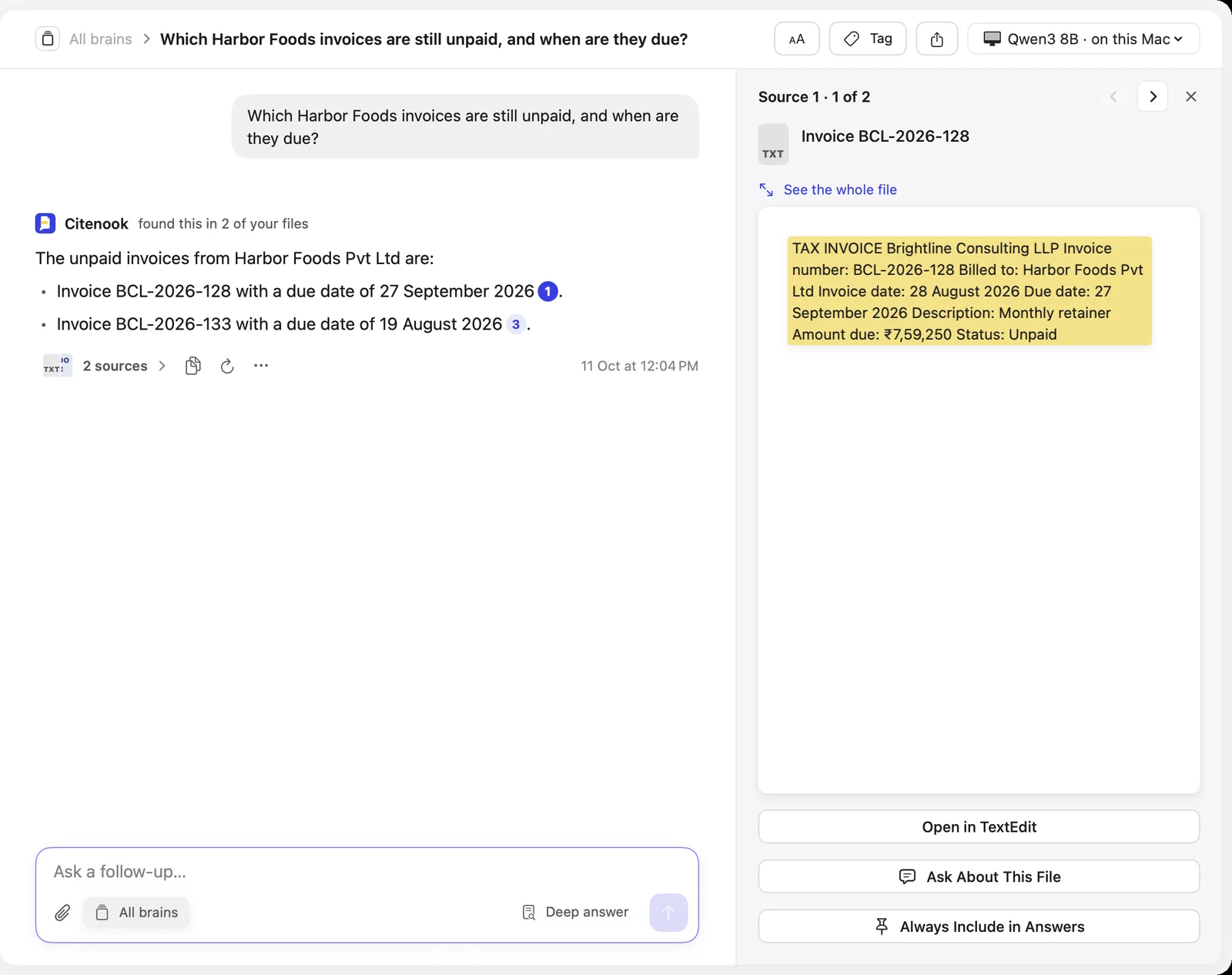
Be clear about its limits: Citenook isn't certified for SOC 2 or similar standards, and hiding details catches common kinds but isn't perfect, so for the most sensitive work use a model on your Mac. It's Mac only. It's free for 30 days, then from $9.99 a month. More on how it fits accounting work: Citenook for accountants.
Questions
Can accountants use ChatGPT?
Yes, for writing, explaining and spreadsheet help. Keep identifiable client data out of personal accounts, check every number and citation, and follow your firm's AI policy and the IRS's June 2026 guidance.
Is it legal to put client tax information into ChatGPT?
It can break IRC section 7216, which makes it a crime for preparers to knowingly or recklessly disclose return information without consent. The IRS hasn't ruled directly on AI tools, so get written consent and use an enterprise-approved tool, or leave the data out.
Does ChatGPT Business keep client data private?
OpenAI says it doesn't train on Business or Enterprise data by default, encrypts it, and holds SOC 2 Type 2 reports. Your data still goes to OpenAI's servers, so your confidentiality and consent duties still apply.
Can ChatGPT do my bookkeeping or tax return?
No. It doesn't connect to your books or the IRS and makes arithmetic mistakes. Use it for drafts and explanations, and your accounting software for the numbers.
Do I have to tell clients I use AI?
The IRS alert says practitioners should disclose AI activities as needed and pass on cost savings. The AICPA requires client consent before confidential information is shared with a third party.
What's the safest way to use AI on client files?
Keep the files on your computer and use a model that runs there, so nothing is sent anywhere. Apps like Citenook do this on a Mac.
Sources, checked 11 October 2026: IRS Office of Professional Responsibility Alert 2026-19, Introductory Guidelines for Responsible AI Use in Federal Tax Practice; 26 U.S.C. § 7216; Journal of Accountancy on the AICPA confidentiality rule; IRS written information security plan reminder; FTC Safeguards Rule guide; OpenAI business data privacy, data controls, pricing, Plus and Business. Citenook screenshot from our own test with made-up sample files.