 Citenook1
Blog · Guides
AI for contract review: tools, ethics rules and keeping files private
AI can review contracts well: it finds clauses, flags terms that differ from your standards, summarizes obligations and dates, and compares versions in seconds. The catch is confidentiality. Most tools send the contract to an AI company's servers, and US ethics rules expect lawyers to protect client information and, in some cases, get the client's informed consent first. Use a business tool that doesn't train on your data, or one that runs on your own computer, and always check the answer against the clause itself.
This guide covers what AI contract review does, where your contract goes, what the ethics rules say, the main tools, and a checklist for using AI on contracts safely. Details were checked on 9 October 2026. It's general information, not legal advice.
What AI contract review does
- Finds clauses: termination, liability caps, indemnities, governing law, renewal and notice terms, even in long agreements.
- Flags risks against a playbook: compares each clause with your standard positions and points out what's missing or different, like an uncapped indemnity.
- Suggests redlines: many tools write tracked changes in Word with a reason for each one.
- Summarizes: parties, term, fees, obligations and key dates, ready for a client email or a contract tracker.
- Compares versions: what changed between the draft and the signed copy, or between your template and their paper.
- Answers questions: "Can we end this early?" with a link back to the text the answer came from.
It doesn't replace the lawyer. It reads fast and misses context, like a side letter, an industry custom or what was agreed on a call.
Where your contract goes
This is the question to answer before you upload anything.
| Type of tool | Where the contract is processed | Used for training? |
|---|---|---|
| Free or personal chatbot accounts | The AI company's servers | Often yes, unless you turn it off |
| ChatGPT Business or Enterprise, Claude for Work, the APIs | The AI company's servers | No, by default |
| Legal AI tools (Spellbook, LegalOn, Harvey and others) | The vendor's cloud and its AI providers | No, by their published policies; check the contract |
| Apps that run a model on your computer | Your computer only | No; nothing is sent |
"Not used for training" isn't the same as "never leaves your office". The text is still sent, processed and sometimes kept for a while for abuse checks. For what each big chatbot does with what you paste, see is it safe to paste client files into ChatGPT.
What the ethics rules say
In the US, there's no special AI rule. Bar regulators apply the rules lawyers already follow:
- ABA Formal Opinion 512 (July 2024) applies the duties of competence, confidentiality, communication, supervision and reasonable fees to generative AI. Lawyers must understand the tool well enough to use it, protect client information, and check its output. For tools that learn from what you put in, the opinion says the client's informed consent is needed first, and boilerplate in an engagement letter isn't enough.
- California's 2026 guidance says a lawyer "must not input any confidential information of the client into a generative AI solution that may present material risks to confidentiality or security, absent informed client consent," and that checking a tool "require[s] more than reliance on generalized marketing assurances."
- Texas Opinion 705 (February 2025) says not to enter confidential information without consulting the client and getting consent, unless you're satisfied the tool protects it, and not to bill clients for time the AI saved.
- Florida Advisory Opinion 24-1 (January 2024) recommends getting informed consent before using a third-party AI tool that would see confidential information.
Other states have issued their own guidance, and it keeps changing. Check your state bar before relying on any of this.
Two cases worth knowing
- Mata v. Avianca (2023): lawyers were sanctioned $5,000 for filing cases ChatGPT made up. The court said there's nothing improper about using a reliable AI tool; the failure was not checking.
- United States v. Heppner (2026): a federal court in New York found that a client's own chats with a consumer AI chatbot weren't privileged, and that putting the lawyer's advice into it waived privilege. Enterprise tools used under a lawyer's direction may be treated differently, but it shows that where you type matters.
The main AI contract review tools in 2026
| Tool | Best for | Works in Word | Data, per the vendor | Price |
|---|---|---|---|---|
| Spellbook | Law firms and in-house teams drafting and reviewing | Yes | Zero-retention deals with its AI providers; SOC 2 Type II | On request; 7-day trial |
| LegalOn | Review against playbooks | Yes | Doesn't train on customer data; SOC 2 Type II, ISO 27001 | Per seat, on request |
| Harvey | Large firms, many legal tasks | Not confirmed | No training by default; zero retention with providers; EU and other regions | On request |
| Luminance | Contract-heavy teams, negotiation | Yes | Each customer's data kept separate; ISO 27001, SOC 2 Type II | Demo only |
| Ironclad | Companies managing many contracts | Yes | SOC 2 Type II, ISO 27001; US hosting | On request |
| Microsoft Copilot in Word | Teams already on Microsoft 365 | Yes (Legal Agent preview, US, Windows) | Your files aren't used to train its models | Needs a Copilot license |
Most legal AI tools are cloud services sold through a demo, and few publish prices. Ask each vendor for its data processing terms, where data is stored, how long it's kept, and whether its AI providers keep anything. That's what California means by more than "marketing assurances".
Can you use ChatGPT or Claude to review a contract?
Technically, yes, and they're good at summaries and first passes. For client contracts, use a business account (ChatGPT Business or Enterprise, Claude for Work) or the API, where your data isn't used for training by default, and check that your firm's policy and the client allow it. Avoid personal accounts. Paste only the clauses you need, with names removed, and never rely on a quote you haven't checked in the document; general chatbots can invent clause wording that sounds right.
A checklist for reviewing contracts with AI safely
- Check the contract itself. Its confidentiality clause may limit who you can share it with, including AI services.
- Check consent. Does your engagement letter, firm policy or the client allow it? If the tool sends data out, get informed consent where your bar requires it.
- Pick the tool by where data goes. Business terms with no training, or a tool that runs on your computer for the most sensitive files.
- Send less. Clauses instead of whole agreements; names and numbers removed where you can.
- Check every answer against the clause. Click through to the text. If a tool can't show where an answer came from, treat it as a guess.
- Keep the judgment human. AI flags; you decide what matters for this client and this deal.
- Bill fairly. Charge for time actually spent, not time the AI saved.
Reviewing contracts without uploading them
If your contracts can't leave your computer, the AI has to run on it too. Citenook is a Mac app that reads your contract folders and answers questions about them, with every answer linked to the clause and page it came from. With Apple Intelligence or a model it downloads, nothing leaves your Mac, even with Wi-Fi off. Here's a real test with made-up sample contracts, asking what changed between a draft and the signed version:
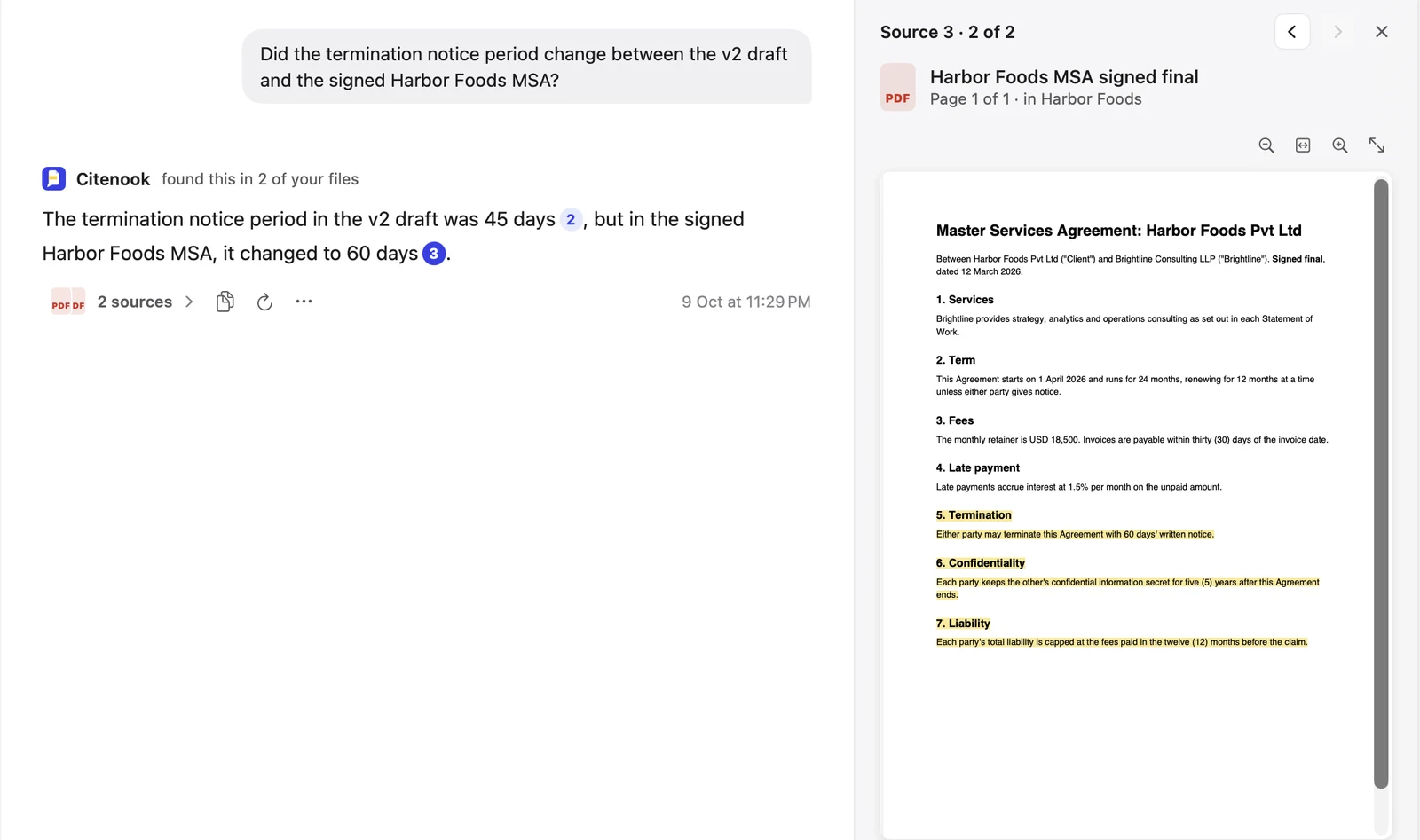
It's good for finding clauses, checking terms across many contracts and comparing versions. It isn't a full contract review suite: it doesn't redline in Word, check against a playbook, or manage contract workflows, and it's Mac only. It's free for 30 days, then from $9.99 a month. See Citenook for lawyers and exactly what goes where.
Questions
Can AI review a contract?
Yes. It can find clauses, flag terms that differ from your standards, summarize obligations and compare versions. A person still needs to check its findings and judge what matters.
Is it safe to upload a contract to ChatGPT?
Not to a personal account, where your chats may be used for training unless you opt out. Business and Enterprise plans and the API don't train on your data by default, but the contract is still sent to OpenAI. Check the contract's confidentiality clause and your client's consent first.
Do lawyers need client consent to use AI?
Sometimes. ABA Formal Opinion 512 calls for informed consent before putting client information into tools that learn from it, and California, Texas and Florida guidance says similar things. Rules differ by state, so check yours.
How accurate is AI contract review?
Good at finding and summarizing clauses, weaker at context and unusual wording. Always check each finding against the clause; tools that link answers to the source text make that quick.
Is there AI contract review that works offline?
Yes, with a model on your own computer. Citenook does this on a Mac; you can also build your own setup with LM Studio or Ollama.
What's the best AI for contract review?
It depends on the job. Spellbook and LegalOn are built for review in Word against your standards; Harvey suits large firms; ChatGPT or Claude business plans work for first passes; an on-device app suits files that can't be uploaded.
Sources, checked 9 October 2026: ABA Formal Opinion 512 announcement, State Bar of California guidance, Texas Opinion 705, Florida Advisory Opinion 24-1, United States v. Heppner summary, Spellbook security, LegalOn security, Harvey security, Luminance security, Ironclad security, Microsoft Legal Agent for Word, ChatGPT business data policy, Claude training policy. Citenook's screenshot is from the app with made-up contracts.