 Citenook1
Blog · Privacy
Is Microsoft Copilot safe? What Microsoft does with your chats
Microsoft Copilot is safe for everyday questions, and since the new Copilot app arrived on 18 August 2026, Microsoft says your prompts, answers and files "aren't used to train foundation models." It still isn't fully private: chats stay in your account until you delete them, humans may review some, and on the free app ads can be personalized with your chat history. Work accounts get stronger, contract-backed protection.
This guide covers which Copilot you're using, training, how long chats are kept, who can read them, ads, work accounts, how Copilot compares with ChatGPT, Gemini and Claude, other risks, and the settings to change. It's about Microsoft's Copilot assistant, not GitHub Copilot for code. Facts come from Microsoft's own support and Learn pages, checked on 28 October 2026.
Which Copilot are you using?
"Copilot" is several products with different privacy rules. The account you sign in with decides which rules apply.
| Version | Signed in with | Price (US) |
|---|---|---|
| Copilot app and copilot.microsoft.com | Personal Microsoft account | Free, with limits |
| Copilot in Word, Excel and Outlook at home | Personal Microsoft account | Microsoft 365 Personal $9.99, Family $12.99, Premium $19.99 a month |
| Copilot Chat for work | Work or school account | Included with eligible Microsoft 365 business plans |
| Microsoft 365 Copilot (now called Microsoft Copilot in Microsoft's work docs) | Work account | $30 per user a month, paid yearly |
Microsoft also changed the rules for the personal app on 18 August 2026. Its older privacy FAQ now says it "applies only to the older version of the Microsoft Copilot app." Most articles about Copilot privacy still describe that older version.
Does Copilot train on your chats?
Not in the new app, according to Microsoft. Its activity history page for personal accounts says: "Prompts, responses, and your file contents when using the Microsoft Copilot app aren't used to train foundation models." The same promise covers Copilot in the Microsoft 365 home apps. When we checked the settings of a personal account, there was no training switch anywhere, because there's nothing to turn off.
Two details are worth knowing:
- Feedback is different. If you press thumbs up or down, Microsoft may use that feedback to improve Copilot, though it says it doesn't use feedback to train the foundation models.
- The older app trained by default. If you haven't updated, Microsoft's older FAQ applies: it trains on your "voice and conversation activity with Copilot, including the images or files you upload" unless you opt out, except for users under 18, people not signed in, and users in Brazil, China (not Hong Kong), Israel, Nigeria, South Korea and Vietnam. The switches were called "Training on conversation activity" and "Training on voice conversations", under Privacy in your profile. On the web and in the updated app, the new rules apply.
How long Copilot keeps your chats
Microsoft's new-app pages say Copilot "keeps your prior conversations with Copilot so you can revisit them or continue them at any time." They don't give an automatic deletion period, so plan on chats staying until you delete them. The older app stored conversations for 18 months by default, and uploaded files for "no longer than 18 months."
- Delete one chat: in the Chats list, select the chat, then More (the three dots) and Delete.
- Delete everything: use "Manage your Copilot activity history" in the Microsoft privacy dashboard, where you can also export it.
- Memory: Copilot can remember details such as your goals and favorite topics. Turn off Saved memories under Settings, then Personalization. Turning it off doesn't delete what's already saved: choose Manage, then Delete all memories. A separate Chat history switch there lets Copilot use your past chats to personalize answers.
Who can read your Copilot chats?
On personal accounts, Microsoft says: "Humans may review your conversations in Copilot for safety, legal, product improvement, or troubleshooting." The older FAQ was blunter: "an opt-out of human review is not available," and Microsoft also works with outside research organizations that review conversation logs for safety.
Microsoft's own advice for the older app is a good rule for both: don't share "confidential or sensitive personal data" you wouldn't want Microsoft to use for the purposes in its privacy statement. Other people only see a chat if you share it.
Does Copilot use your chats for ads?
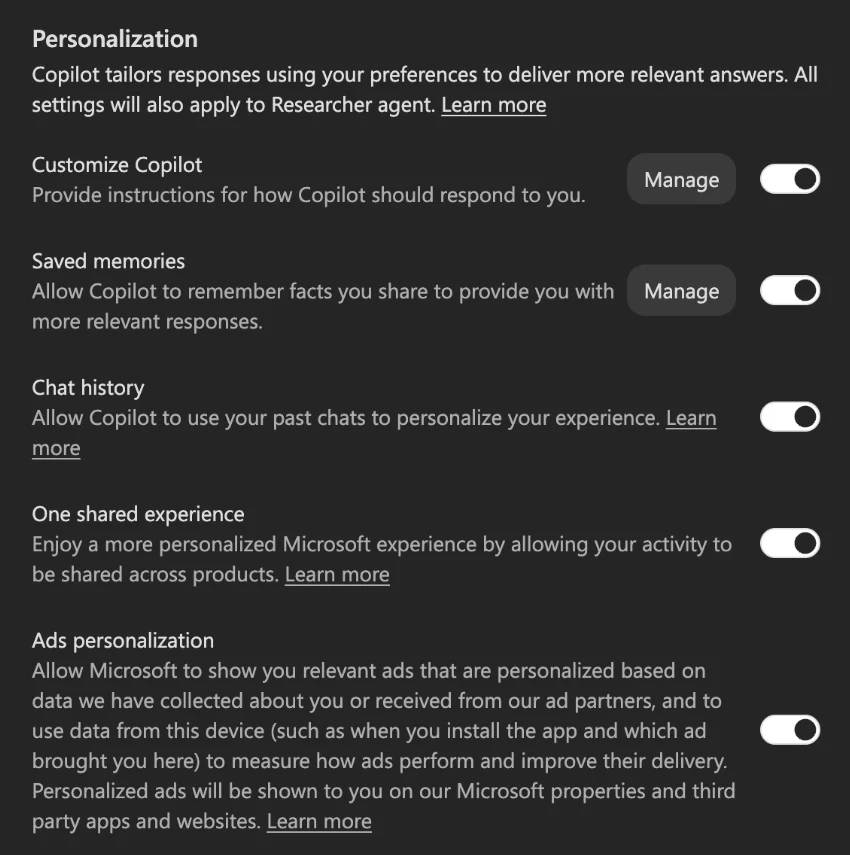
It can, on the free app. Microsoft says that if you don't have a Microsoft 365 subscription, "you might see advertising in Copilot." Generic ads use only your current conversation. Personalized ads "might use your chat history, saved memories, and other Microsoft data you've chosen to share."
- To stop personalized ads: Settings, then Personalization, then turn off Ads personalization. The switch's own text says personalized ads are also "shown to you on our Microsoft properties and third party apps and websites." You can turn off personalized ads for all Microsoft services in the privacy dashboard too.
- Shared experiences is a separate switch: your Copilot chats can personalize Bing, Edge and MSN, and the other way round. Turn off One shared experience in the same place.
- Users under 18 never get personalized ads, and work accounts get no ads in Copilot Chat.
Is Copilot safe for work and confidential files?
With a work or school account, much more so. Microsoft calls it enterprise data protection, and in Copilot Chat it shows as a green shield. The commitments are part of Microsoft's contract with your company:
- "Prompts, responses, and data accessed through Microsoft Graph aren't used to train foundation LLMs."
- No human review: Microsoft says "Microsoft Copilot services have opted out of" the abuse monitoring that includes human review.
- "We won't use your data except as you instruct," with "encryption at rest and in transit."
- No ads when you're signed in with a work account.
Three things to know. Your prompts and answers are logged in your company's Microsoft 365 for "auditing/eDiscovery," so your employer's admins can search them. Copilot shows people anything they already have permission to open, so files shared too widely in SharePoint become easy to find. And a personal Microsoft account used for work follows the personal rules above, not your company's contract. If you handle client files, your professional rules still apply; see our guides to ChatGPT for lawyers and AI for HR, which apply to Copilot too.
Copilot vs ChatGPT vs Gemini vs Claude on privacy
| Copilot | ChatGPT | Gemini | Claude | |
|---|---|---|---|---|
| Personal plans train on chats | No, in the new app (older app: yes, unless you opt out) | Yes, unless you turn it off | Yes, with Keep Activity on (default for adults) | If "Help improve our AI models" is on |
| How long chats are kept | Until you delete them (older app: 18 months) | Until you delete them, then within 30 days | 18 months by default | Until you delete them, then within 30 days |
| Human review | May happen; no opt-out in the older app | Staff and outside reviewers | A subset, kept up to 3 years | Not by default |
| Business plans train | No | No, by default | No, on core Workspace | No, by default |
On training, Copilot's new personal app has the clearest default here: no training and no switch to find. Its weak spots are ads on the free app and human review you can't switch off. More detail in is ChatGPT confidential, is Gemini safe and is Claude safe.
Other risks to know about
- Security flaws. In June 2025, researchers at Aim Security reported "EchoLeak" (CVE-2025-32711), a flaw that could make Microsoft 365 Copilot leak work data through a crafted email. Microsoft fixed it on its side. Microsoft also says its filters against prompt injection "may not be available in all Microsoft Copilot scenarios."
- Recall isn't Copilot. Windows Recall, on Copilot+ PCs, takes screenshots of your activity only if you opt in. Microsoft says they're "saved and encrypted to your local hard drive" and not shared with Microsoft. It's a Windows feature, not the Copilot chat.
- Importing from Edge. In the US, the Copilot app can import your Edge cookies, history, passwords and payment info if you turn that on under Web browsing. Leave it off if you don't need it.
- Kids and teens. You must be at least 13. For young people, Copilot doesn't personalize from chat history or show personalized ads, and parents can limit it with Microsoft Family Safety.
- Accuracy. Copilot can make mistakes. Check its sources before you rely on an answer.
How to use Copilot more privately
- Update the app so the new no-training rules apply.
- Turn off Ads personalization under Settings, then Personalization.
- Turn off One shared experience if you don't want chats to shape Bing, Edge and MSN.
- Turn off Saved memories and Chat history and delete what's saved, if you don't want Copilot to remember you.
- Delete chats you don't need, or clear them all in the privacy dashboard.
- Use your work account for work, and check for the green shield.
When files shouldn't leave your computer
Even without training, Copilot sends your words and files to Microsoft's servers. For documents you can't send to any company, the AI has to run on your own machine. Citenook is a Mac app that answers questions from your own folders with Apple Intelligence or a model it downloads, so the files and your chats stay on your Mac, and every answer links to the passage it came from. If you choose an online AI with your own key instead, only the passages for that answer are sent, with names and numbers hidden first.
It's Mac only, doesn't work inside Word or Outlook like Copilot, and starts at $9.99 a month after a 30-day free trial. See also what private AI really means.
Questions
Is Microsoft Copilot safe to use?
For everyday questions, yes. For private information, know the limits: chats are kept until you delete them, humans may review some, and the free app can personalize ads with your chat history unless you turn that off.
Does Copilot train on my data?
Microsoft says the new Copilot app, released on 18 August 2026, doesn't use your prompts, answers or files to train foundation models. The older app did unless you opted out. Work accounts aren't used for training.
Can Microsoft employees read my Copilot chats?
On personal accounts, humans may review conversations for safety, legal reasons, product improvement or troubleshooting. Microsoft says its work Copilot services have opted out of human review.
Can my employer see my Copilot chats?
On a work account, yes, if they look: prompts and answers are logged in your company's Microsoft 365 for auditing and eDiscovery. Chats on a personal account aren't in your company's system.
Is Copilot private?
Not fully. It doesn't train on your chats in the new app, but your chats are stored on Microsoft's servers, can be reviewed, and can feed ad personalization on the free app. Turn off ad personalization and delete chats you don't need.
Is Windows Recall part of Copilot?
No. Recall is an opt-in Windows feature on Copilot+ PCs that saves encrypted screenshots on your own computer. Copilot chats are separate and stored in your Microsoft account.
Sources, checked 28 October 2026: Microsoft Copilot for individuals: your activity history, your privacy controls and choices, Copilot for young people, the older Privacy FAQ for Microsoft Copilot, data, privacy and security for Microsoft Copilot, enterprise data protection, the Copilot Chat FAQ, Recall, and Microsoft's home and business price pages. EchoLeak as reported by Aim Security. ChatGPT, Gemini and Claude facts from our earlier guides. Screenshot from our own account settings.