 Citenook1
Blog · Comparisons
The best AI apps for Mac in 2026, and where your data goes
The best AI apps for Mac in 2026 are ChatGPT, Claude or Gemini for everyday chat, Apple Intelligence for free built-in writing help, Raycast for quick access from the keyboard, LM Studio or Ollama for running models on your own Mac, and MacWhisper or Superwhisper for voice. For questions about your own files, Citenook and Elephas read your documents and show their sources. Which one fits depends on what you do and where your data is allowed to go.
Every price, requirement and privacy detail below comes from each company's own pages, checked on 15 October 2026. Most lists skip one question, so we answer it for every app: does what you type leave your Mac?
The list at a glance
| App | Best for | Price | Data leaves Mac? |
|---|---|---|---|
| ChatGPT | All-round help | Free; $20/mo | Yes |
| Claude | Writing, long files | Free; $20/mo | Yes |
| Gemini | Google users | Free; $19.99/mo | Yes |
| Copilot | Microsoft 365 users | Free | Yes |
| Perplexity | Web answers | Free; paid plans | Yes, by default |
| Apple Intelligence | Built-in writing help | Free | Partly |
| Raycast AI | AI from the keyboard | $10/mo | Unless local |
| LM Studio | Local models | Free | No |
| Ollama | Simple local models | Free | No |
| MacWhisper | Transcribing | Free; €64 once | No |
| Superwhisper | Dictation | Free; $8.49/mo | Not with local models |
| Citenook | Cited answers from private files | From $9.99/mo | Not with a Mac model |
| Elephas | Files plus writing | From $19/mo | Yes, unless offline |
Prices are per month in US dollars, for the first paid plan. "Partly" means Apple sends some requests to its own servers. "Unless local" means data stays on the Mac only if you pick a local model.
AI chat assistants
1. ChatGPT
OpenAI's desktop app is the most complete all-round assistant on the Mac. Since July 2026 the app combines Chat, Work and Codex in one window (the older app is now called ChatGPT Classic), and pressing Option and Space opens a small chat bar over any app.
- Price: free plan; Plus is $20 a month; Pro starts at $100 a month.
- Needs: macOS 14 or later, on Apple silicon or Intel.
- Your data: everything goes to OpenAI. On personal plans, the setting that lets OpenAI use your chats to improve its models is on by default; you can turn it off in Data controls.
- Downside: no offline mode. See can you use ChatGPT offline.
2. Claude
Anthropic's app is strong at writing, editing and reading long documents. Its Cowork feature can work with folders you connect on your Mac, and desktop extensions add access to files, calendar and email.
- Price: free plan; Pro is $20 a month, or $17 a month billed yearly; Max starts at $100 a month.
- Needs: macOS 13 or later; builds for Apple silicon and Intel.
- Your data: prompts and the files you share go to Anthropic.
- Downside: cloud only, and the bigger plans get expensive.
3. Gemini
Google released a native Gemini app for Mac on 15 April 2026. Option and Space opens a mini chat, Option, Shift and Space the full window, and your chat history syncs with your Google account.
- Price: free; Google AI Plus is $4.99, AI Pro $19.99 and AI Ultra from $99.99 a month.
- Needs: Apple silicon and macOS 15 or later.
- Your data: goes to Google's cloud.
- Downside: doesn't run on Intel Macs. Many lists still say Gemini is web only; that's out of date.
4. Microsoft Copilot
A free app on the Mac App Store. It suits people who already pay for Microsoft 365, since Personal ($9.99 a month), Family and Premium plans raise Copilot's limits.
- Needs: macOS 14 or later.
- Your data: goes to Microsoft's cloud.
- Downside: fewer desktop features than ChatGPT or Claude.
5. Perplexity
Perplexity answers from the live web and lists its sources, which makes it good for research on current topics. The Mac app can also work with local folders and, on paid plans, run some models on Apple silicon.
- Price: free plan; paid Pro and Max plans (Max is $200 a month).
- Needs: macOS 15 or later.
- Your data: goes to Perplexity's cloud unless you choose a local model.
- Downside: built for web search, not for your private documents.
Built into your Mac
6. Apple Intelligence
Already on your Mac if it's supported: Writing Tools (rewrite, proofread, summarize) in almost any app, notification summaries, Image Playground and Shortcuts that use Apple's models. With macOS 27 it adds Siri AI (in beta) and more. Apple runs some requests on your Mac and others on its own servers, and you can turn on a ChatGPT extension for harder questions, without a ChatGPT account.
- Price: free, with daily limits on server-based features.
- Needs: a Mac with M1 or later, a recent macOS, and up to 8 GB of free storage (more on some Macs).
- Downside: weaker than ChatGPT or Claude on hard tasks, and some features aren't available in every country or language.
From the keyboard
7. Raycast AI
Raycast is a launcher that replaces Spotlight. Its Pro plan adds AI chat with many models in one place, AI commands and extensions. You can also use local models through Ollama or bring your own API keys.
- Price: Pro is $10 a month, or $96 a year. The free version has no AI.
- Needs: macOS Tahoe (26) and Apple silicon.
- Your data: goes to the model company you pick, unless you use local models; chats are stored on your Mac unless you turn on Cloud Sync.
- Downside: older Macs and older macOS versions can't run it.
Run AI models on your own Mac
These apps download open models and run them on your Mac, so nothing you type is sent anywhere. Local models are simpler than ChatGPT's best ones, and they need memory: 16 GB is a comfortable start. For a side-by-side, see LM Studio vs Ollama.
8. LM Studio
The friendliest way to try local models: search, download and chat in one app. It now calls itself LM Studio Bionic and adds an agent and optional paid cloud models.
- Price: free for local models; cloud plans cost $20 or $100 a month.
- Needs: Apple silicon, macOS 14 or later, 16 GB of memory recommended.
- Your data: local chats and documents stay on your Mac. The optional cloud models and web search do send data out.
9. Ollama
Free and simple. Its Mac app has a chat window where you can drop text files and PDFs, and many other apps can use Ollama's models.
- Price: free for local models; cloud plans from $20 a month.
- Needs: macOS 14 or later.
- Your data: stays on your Mac with local models.
- Downside: the chat app is basic.
Voice and transcription
10. MacWhisper
Transcribes recordings, videos and meetings on your Mac. Good for interviews and calls you can't send to a cloud service.
- Price: free version with smaller models; Pro is a one-time €64.
- Needs: macOS 14 or later; an M-series Mac is recommended.
- Your data: transcription happens on your device.
11. Superwhisper
Dictation that works in any app and tidies up what you say. It runs offline with local models, or with cloud models if you choose them.
- Price: free plan; Pro is $8.49 a month, $84.99 a year or $249.99 once.
- Needs: local models run best on Apple silicon.
- Your data: stays on your Mac with local models.
Chat with your own files
General chat apps make you upload or paste files one at a time. These two apps read whole folders of your documents and show where each answer came from.
12. Citenook
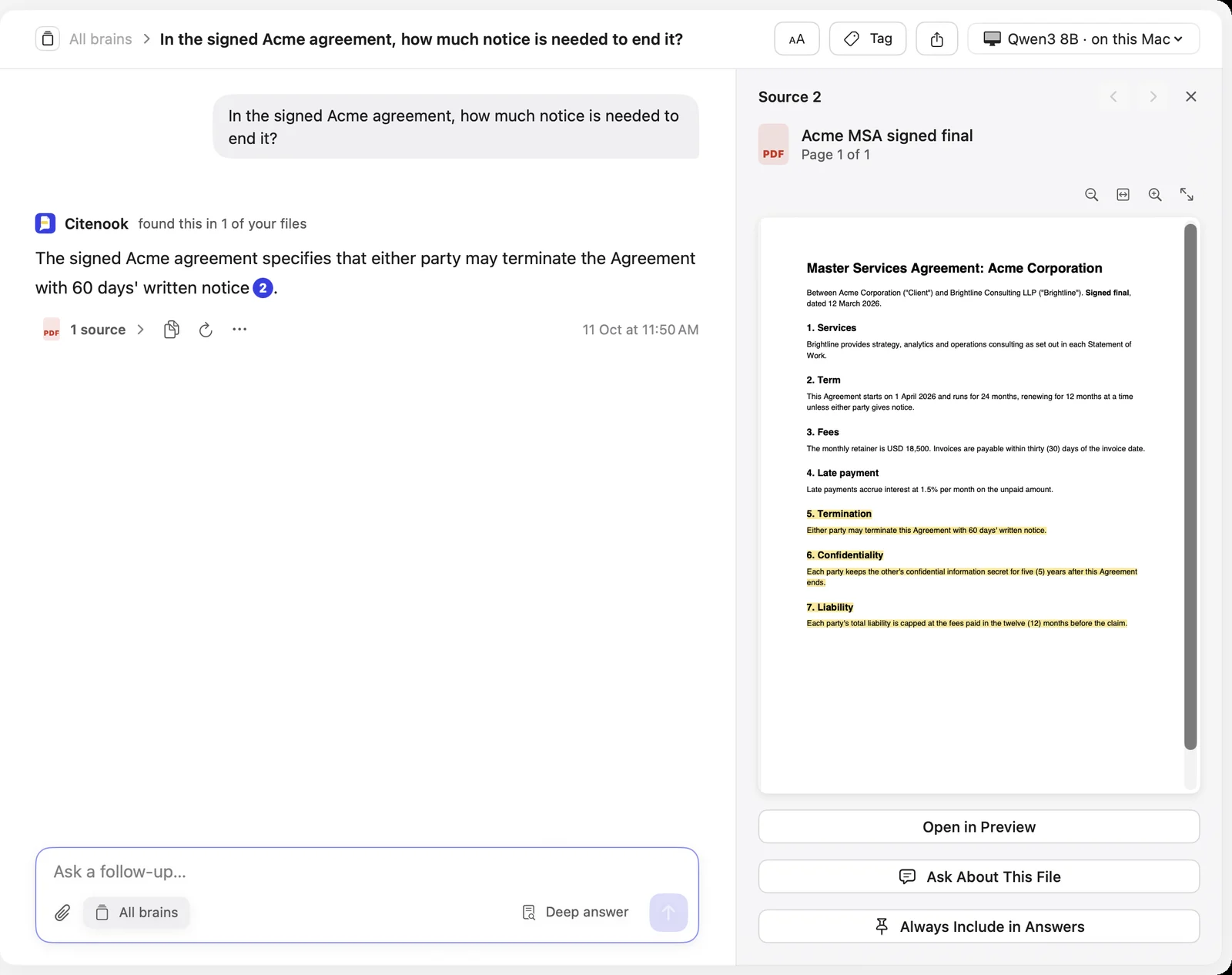
Disclosure: Citenook is our app. Citenook answers questions from your folders, PDFs, Word files, Apple Notes and Obsidian vault, and every answer links to the exact sentence it came from. With Apple Intelligence or a free model you download, it works with Wi-Fi off and nothing leaves your Mac. If you choose an online AI instead, it hides names, emails and other personal details first and shows you what will be sent.
- Price: free for 30 days, then from $9.99 a month, or $79 a year.
- Needs: Apple silicon and macOS 15 or later.
- Downside: it answers from your files only; it doesn't write in other apps or make audio or slides. Models on your Mac are simpler than the best cloud models.
13. Elephas
A Mac assistant that combines chat with your files (its Super Brain) with writing help in any app. It indexes files on your Mac; chat goes to cloud AI with personal details removed first, and fully offline AI is an option.
- Price: 20 free credits a month; paid plans are $19, $39 or $49 a month.
- Needs: macOS 13 or later; offline AI needs Apple silicon.
- Downside: credits limit the built-in AI, and it costs more than most apps here. See Citenook vs Elephas.
How to choose
- You want one app for everything: ChatGPT or Claude. Gemini if you live in Google's apps.
- You don't want to pay: Apple Intelligence plus the free plan of ChatGPT, Claude or Gemini.
- Your work is confidential: use a local model (LM Studio, Ollama) or an app that runs one for your files (Citenook). Check each app's data settings before you paste client or patient details; see is it safe to paste client files into ChatGPT.
- You work from the keyboard: Raycast, or the ChatGPT and Gemini shortcuts.
- You talk more than you type: Superwhisper for dictation, MacWhisper for recordings.
One small trap: ChatGPT, Gemini and Citenook's Quick Ask all start on Option and Space. If you use more than one, change or turn off the shortcut in all but one of them.
Questions
What is the best free AI app for Mac?
Apple Intelligence is free and built in on Macs with M1 or later. For chat, the free plans of ChatGPT, Claude and Gemini are all good. For privacy, LM Studio and Ollama are free and run models on your Mac.
Is there a ChatGPT app for Mac?
Yes. OpenAI's desktop app runs on macOS 14 or later, on Apple silicon and Intel Macs, and opens a quick chat bar with Option and Space.
Does Gemini have a Mac app?
Yes, since 15 April 2026. It needs an Apple silicon Mac and macOS 15 or later.
Which AI apps work offline on a Mac?
LM Studio, Ollama, MacWhisper, Superwhisper with local models, and Citenook with Apple Intelligence or a downloaded model. ChatGPT, Claude, Gemini, Copilot and Perplexity need the internet.
Do AI apps for Mac need Apple silicon?
Many do. Gemini, Raycast, LM Studio and Citenook need Apple silicon, and Apple Intelligence needs M1 or later. ChatGPT, Claude and Ollama still run on Intel Macs.
Sources, checked 15 October 2026: ChatGPT macOS app and Pro plans, Claude pricing and desktop app, Gemini for Mac and Google AI plans, Microsoft Copilot on the App Store, Perplexity Max, Apple Intelligence requirements, Raycast pricing, LM Studio pricing and requirements, Ollama pricing and macOS docs, MacWhisper, Superwhisper, Elephas pricing.