 Citenook1
Blog · Comparisons
The best LM Studio alternatives for Mac (and Ollama alternatives)

The best LM Studio alternative depends on why you want to switch. Ollama is the closest swap: free, open source, with a Mac app and MLX on Apple silicon by default. Jan is an open-source desktop app that looks and works much like LM Studio. AnythingLLM is best for chatting with documents, Open WebUI for a browser interface on a home server, and llama.cpp for full control. To ask questions across whole folders with cited answers, there's Citenook.
This guide also covers Ollama alternatives. Versions, licences and Mac requirements come from each project's own site and GitHub, checked on 24 October 2026. We make Citenook, one of the apps on this list, so we've tried to be plain about where others do better. New to running models? Start with how to use LM Studio on a Mac.
Why people look for an LM Studio alternative
- It's closed source. The app itself isn't open source, though its command-line tool, MLX engine and SDKs are MIT-licensed. Some people want an app whose code they can read.
- They want a command line or a server first. Ollama and llama.cpp are built for that and run quietly in the background.
- They want answers from their documents. LM Studio attaches files to a single chat. Searching a whole folder needs a different tool.
- They have an Intel Mac. LM Studio doesn't support Intel Macs. Ollama runs on them using the processor only, and AnythingLLM has an Intel build.
The alternatives at a glance
| App | Best for | Type, licence | Last release |
|---|---|---|---|
| Ollama | Closest swap, local server | Mac app, command line, MIT | 23 Oct 2026 |
| Jan | Open-source desktop app | Mac app, Apache 2.0 | 20 Oct 2026 |
| Anything | Chat with documents | Mac app, MIT | 13 Oct 2026 |
| Open WebUI | Web interface for a home server | Web app, own licence | 16 Oct 2026 |
| llama.cpp | Full control | Command line, MIT | 15 Oct 2026 |
| GPT4All | Not for new setups | Mac app, MIT | 25 Feb 2025 |
| Citenook | Cited answers from whole folders | Mac app, paid | 12 Oct 2026 |
All of these are free to run on your own Mac except Citenook. Release dates are each project's latest GitHub release.
Ollama: the closest swap
Ollama is the most popular way to run models locally, with about 185,000 stars on GitHub. Many lists still say it has no interface, but that's out of date: since July 2025, its Mac app lets you "download and chat with models," and it "supports file drag and drop" for text and PDFs.
- MLX on Apple silicon: since version 0.40.0 (25 September 2026), models that MLX supports run on it by default on Apple silicon Macs. Other models still run through llama.cpp.
- Mac needs: macOS 14 Sonoma or newer. Apple silicon uses the graphics chip; Intel Macs run on the processor only.
- Server: other apps connect to it at port 11434, and it supports part of the OpenAI API.
- Price: local use is free; Ollama says running models on your own hardware "is always unlimited." Its paid plans are for cloud models, which aren't private in the same way.
The trade-off: the app is a plain chat window. We didn't find a way to search a whole folder of files in it. For the full comparison, read LM Studio vs Ollama.
Jan: an open-source LM Studio
Jan is a free desktop app under the Apache 2.0 licence, and the closest open-source match to LM Studio's look and feel. It needs macOS 13.6 or newer, and Apple silicon to run models locally. Its README gives a simple memory guide: "8GB RAM for 3B models, 16GB for 7B, 32GB for 13B."
You can add files to a Project, where Jan indexes them for every chat in that project, or attach them to one chat. It has its own local server on port 1337 and can also connect to cloud models. If you pick a cloud model, your files go to that company, so check which model is selected. Jan runs models with llama.cpp; we didn't find MLX support in its docs.
AnythingLLM: for chatting with documents
AnythingLLM is a free, MIT-licensed app for Mac, Windows and Linux, with separate downloads for Apple silicon and Intel Macs and no sign-up. It's built around workspaces of documents, and its download page says "your models, documents, and chat history stay on your machine." It can use its own model or the ones you already have in Ollama or LM Studio. It's flexible, though you may need to tune its settings to get the best answers. We compare it with our app in Citenook vs AnythingLLM.
Open WebUI: a browser interface for a home server
Open WebUI runs in your browser rather than as a Mac app. You install it with Python or Docker and connect it to Ollama, LM Studio or any OpenAI-compatible service. It has document search built in and suits people who run models on one machine and use them from others.
Many lists call it open source, but its licence changed in April 2025 (version 0.6.6). The current Open WebUI License forbids removing its branding, except for setups with up to 50 users in 30 days or with permission. For personal use that doesn't matter; for a company product it might.
llama.cpp: full control
llama.cpp is the engine underneath many local AI apps, LM Studio included. It's MIT-licensed, treats Apple silicon as "a first-class citizen" with Metal support, and installs with brew install llama.cpp. Its server includes a simple web interface and an OpenAI-compatible API. There's no Mac app, so expect the Terminal and plenty of options. It changes fast, so check its README for current commands.
GPT4All: why we'd skip it for now
GPT4All still shows up on most lists, and its LocalDocs feature, which links a chat to folders on your computer, was a good idea. But its last release was version 3.10.0 on 25 February 2025, and the code hasn't changed since May 2025. That means no updates for newer models or fixes in 20 months. If you already use it and it works, fine; for a new setup, pick one of the active apps above.
Others you may see
- Msty is a desktop app for local and online models with document collections it calls Knowledge Stacks. It has a free plan, and Aurum costs $149 a year or $349 once. The pages we read didn't state its licence or Mac requirements.
- LocalAI is an MIT-licensed server for developers that copies the OpenAI API. Its Mac download isn't signed by Apple, so macOS blocks it until you allow it.
If you're leaving Ollama instead
The same list works in reverse. If you want a friendlier app with a model browser, LM Studio is the usual pick: free at home and at work, MLX and GGUF models, and a local server on port 1234. Jan is the open-source app option, and llama.cpp gives you the engine without Ollama's layer on top. Our LM Studio Mac guide walks through setup step by step.
Our test: asking a whole folder on a Mac
Most of these apps answer questions about files you attach to a chat. We wanted to see what happens when the answer is spread across a folder. We made five fake files for a freelance designer: four client contracts (a PDF, two Word files and a text file) and a page of meeting notes. Then we asked Citenook, using a model running on the Mac: "Which client contracts can be ended with less than 30 days' notice?"
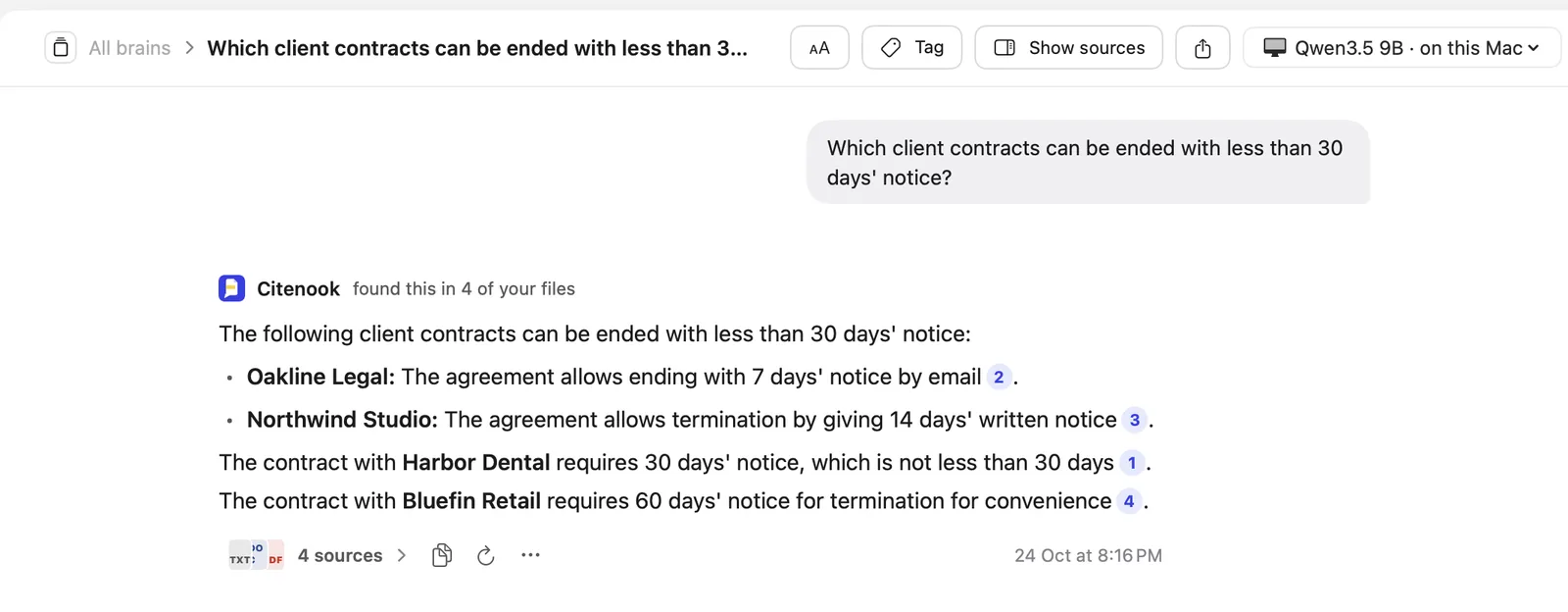
Qwen3.5 9B answered in 9 seconds and got it right: Oakline (7 days) and Northwind (14 days). It also noted that Harbor Dental's 30 days isn't less than 30, and linked each contract. Qwen3 8B was also right, in 12 seconds, with wordier formatting. Neither mentioned the meeting note where one client asked to shorten its notice to 21 days, which wasn't agreed, so the answer was still correct. We didn't install the other apps for this test; what we say about them comes from their own pages.
If your questions are about your own files
The apps above are made for running and chatting with models. Citenook is made for asking about your documents: it keeps whole folders of PDFs, Word files and notes searchable, updates as files change, and links every answer to the exact passage. It can run its own downloaded models, use Apple Intelligence, or, on the Pro plans, use models you already have in Ollama or LM Studio. It's not a general chat app, it's Mac only, and it costs from $9.99 a month after a 30-day free trial. For more on offline models, see offline AI on a Mac.
Questions
What is the best free alternative to LM Studio?
Ollama for most people: it's free, MIT-licensed and has a Mac app. If you want an open-source app that feels like LM Studio, try Jan.
Is LM Studio open source?
No. The app is closed source, though its command-line tool, MLX engine and SDKs are MIT-licensed. It's free to use at home and at work.
Does Ollama have a GUI now?
Yes. Since July 2025, Ollama's Mac and Windows apps let you download models and chat, including dragging in text files and PDFs.
Is GPT4All still maintained?
Its last release was 25 February 2025, and the code hasn't changed since May 2025. It still works, but we'd choose an active app for a new setup.
Is Open WebUI open source?
Not in the usual sense since April 2025. Its own licence forbids removing the Open WebUI branding unless you have 50 users or fewer in 30 days or get permission.
Can I chat with PDFs locally on a Mac?
Yes. Ollama's app takes dropped PDFs, Jan and AnythingLLM index documents, and Citenook searches whole folders. With a local model, nothing is uploaded.
Sources, checked 24 October 2026: Ollama's new app announcement, v0.40.0 release notes, macOS docs and pricing; Jan on GitHub and its Mac install docs; AnythingLLM on GitHub and download page; the Open WebUI License; llama.cpp on GitHub; GPT4All on GitHub; Msty pricing; LocalAI on GitHub. Release dates and star counts from the GitHub API. LM Studio facts from our LM Studio Mac guide.